

LinkedIn Advertising · February 2026 · 18 min read
What Nobody Tells You About LinkedIn Ads
10 insider truths about LinkedIn Ads. Some will save you thousands. Some will make you thousands. None of them are in LinkedIn's help centre.
If you're running LinkedIn Ads right now, there's a very good chance you're wasting money. Not because you're bad at marketing. Because nobody told you how this platform actually works.
LinkedIn is not Meta. It's not Google. The rules are completely different. And the advice you've been given? Most of it was written by LinkedIn themselves. Or by agencies who've never touched a budget under £10k a month. Or by people who just parrot what they read online and have never actually logged into Campaign Manager.
I manage LinkedIn ad accounts for small niche B2B companies. Not enterprise SaaS. Not companies with 30-person marketing teams. Companies with 5 to 50 employees selling specialist stuff to a very specific type of buyer. And I see the same mistakes. Every. Single. Time.
So in this video I'm going to give you 10 things that nobody tells you about LinkedIn Ads. Some of them will make you angry. Some of them will save you a fortune. And at least three of them will make you think "why has nobody told me this before?"
In this article you'll learn:
Why LinkedIn's own recommendations are designed to drain your budget
The lead type that LinkedIn pushes hardest that produces the worst results
How to spy on every competitor's LinkedIn ads for free
The hidden report that shows you exactly which companies are looking at you
The retargeting trick that creates the illusion of omnipresence for pennies
Let's get into it.
1. LinkedIn wants you to spend more, not convert better.
This is the one that changes everything once you see it. LinkedIn is a media company. Their job is to sell ad space. Your success is a nice bonus, but it's not the priority.
Every "recommendation" LinkedIn gives you inside Campaign Manager is designed to increase your spend. Not your results. Your spend.
Audience Network? Turned on by default. It pushes your ads to random third-party apps and websites where nobody is in a B2B buying mindset. Your ad ends up next to a mobile game. LinkedIn gets paid. You get nothing.
Audience Expansion? Also on by default. It broadens your targeting beyond what you selected. You spent 20 minutes carefully choosing job titles and company sizes. LinkedIn quietly overrides that and shows your ads to whoever it wants.
I'm not saying LinkedIn is evil. I'm saying they're a business. And their business model isn't aligned with yours. Once you understand that, you stop trusting the defaults and start making your own decisions.
"LinkedIn's recommendations are designed to fill LinkedIn's bank account. Not yours. Turn off every default setting before you spend a penny."
Campaign Manager — Default Settings
Audience Network
Show ads on third-party apps & sites
Audience Expansion
Broaden targeting beyond your criteria
All three are ON by default. All three waste your budget.
What to do instead
Turn off Audience Network. Every campaign. No exceptions.
Turn off Audience Expansion. You chose those targeting criteria for a reason.
Treat every LinkedIn "recommendation" as a suggestion to spend more money. Because that's what it is.
Go deeper: 3 Hidden Traps Killing Your LinkedIn Ads
2. Cheap clicks are a trap.
Everyone bangs on about CPC. "Our cost per click is £1.50." Great. How many of those clicks turned into a conversation? "Well... none yet. But the CPCs are really good."
A £1.50 click that never converts costs you infinitely more than a £9 click that books a demo.
This is the myth that keeps LinkedIn Ads looking "expensive." People compare LinkedIn's £8-15 CPCs to Meta's £1-2 CPCs and assume LinkedIn is a rip-off. But they're comparing apples to combine harvesters.
On Meta, a £1 click might be someone who accidentally tapped your ad while scrolling through cat videos. On LinkedIn, a £9 click is a Head of Operations at a manufacturing company with 200 employees who deliberately clicked because your ad was relevant to a problem they're actively dealing with.
Which one do you want?
The "expensive" reputation comes from people measuring the wrong thing. If your deal size is £20,000 and it takes you 50 clicks to get one qualified lead, that's £450 per lead at £9 CPC. Sounds steep until you close one deal and make 44x your money back.
£1.50 CPC
Cheap but unqualified
0 demos booked = infinite cost per demo
£9 CPC
Expensive but qualified
1 demo per 50 clicks = £450 per demo
What to do instead
Stop measuring CPC. Start measuring cost per qualified conversation.
If a click from a decision-maker at your dream account costs £9, that's cheap. Ridiculously cheap. You'd pay £500 to sit in a room with that person at a trade show.
Compare what you spend per closed deal, not per click. That's the number that actually matters.
Go deeper: LinkedIn Ads Benchmarks UK 2026
3. Lead Gen Forms give you worse leads.
LinkedIn loves to push Lead Gen Forms. "Higher conversion rates! More leads! Lower cost per lead!" And technically, they're right. You will get more form submissions. The problem is what happens next.
Lead Gen Forms auto-fill from the person's LinkedIn profile. They tap. Their name, email, job title, company. All pre-populated. They hit submit. Done. Took three seconds.
And that's exactly the problem. It took three seconds.
The person didn't visit your website. Didn't read your proposition. Didn't make a deliberate decision to engage. They tapped a button and their details auto-filled. Half the time they don't even remember doing it.
I've seen this consistently across accounts. Lead Gen Forms produce 20-30% lower contact rates than website forms. You ring someone up and they say "I don't remember filling that in." Because they didn't. Not really. LinkedIn did it for them.
And here's the other thing nobody mentions: Lead Gen Forms are most commonly used for lead magnets. PDFs. Free guides. Checklists. "Download our 2026 Industry Report." The person isn't requesting a call. They're grabbing a freebie. These are not the same people who are ready for a conversation with your sales team. They wanted a PDF. That's it.
So now you've got a list of people who auto-filled a form they don't remember, to download a PDF they'll never read, and your sales team is cold-calling them expecting a warm conversation. No wonder the contact rates are terrible.
Meanwhile, someone who clicks your ad, visits your website, reads your page, scrolls down, finds your form, types in their details manually, and hits submit? That person wants to talk to you. They've made a conscious choice. That's a proper lead.
"A form fill that takes 3 seconds produces a lead that takes 3 weeks to chase. A form fill that takes 30 seconds produces a lead that picks up the phone."
What to do instead
Send traffic to your website. Use a dedicated landing page with a clear form.
Yes, you'll get fewer submissions. But the ones you do get will actually answer the phone.
If you insist on using Lead Gen Forms, add qualifying questions that require manual input. Don't let everything auto-fill.
Want better leads from LinkedIn?
Book a call and I'll show you what's actually working right now.
4. You don't need a massive budget. You need a precise one.
"LinkedIn Ads? You need at least £5,000 a month." I hear this constantly. From agencies, from LinkedIn reps, from people who've never actually managed a small B2B account.
It's complete rubbish.
£500 a month on a list of 200 companies with job title layering will outperform £5,000 a month sprayed at 500,000 people. Every single time. Because precision is the cheat code on LinkedIn.
Think about it. If your target market is 200 companies and you're reaching the 3 decision-makers at each one, that's 600 people. You don't need £5,000 to reach 600 people. You need £500 and tight targeting.
Most agencies won't tell you this because they can't justify their management fees on a £500 budget. So they tell you the minimum is £3k or £5k. That's not a LinkedIn requirement. That's a business model requirement. Theirs. Not yours.
The companies that get the best results from LinkedIn are almost never the ones spending the most. They're the ones spending the most precisely.
£500/month on 200 companies with job title layering beats £5,000/month sprayed at 500,000 people.
Precision is the cheat code. Not budget.
What to do instead
Start with £500/month. Upload a company list of your top 100-200 dream accounts.
Layer on 2-3 job titles that match your actual buyer.
Run that for 60 days. Measure cost per conversation. Not cost per click.
Scale when it works. Not before.
Go deeper: LinkedIn Ads Minimum Budget UK 2026
5. LinkedIn can't do what Meta and Google can (yet).
Meta's algorithm is genuinely brilliant. It processes billions of data points. It learns from millions of conversions per day. It can take a broad audience and find your buyers with scary accuracy.
LinkedIn's algorithm? Not even close. It's 3-5 years behind Meta in terms of machine learning capability. And that's being generous.
This matters because the strategies that work on Meta don't work on LinkedIn. Broad targeting. Auto-optimisation. Lookalike audiences. All worse on LinkedIn than their Meta equivalents.
But here's the thing nobody says: it doesn't matter.
You're not paying for LinkedIn's algorithm. You're paying for LinkedIn's data. And here's what makes that data special: it's self-reported. When you target "Head of Marketing" on LinkedIn, that's their actual job title. They typed it in. It's on their profile. Their colleagues can see it. It's real.
On Meta, when you target "interest in marketing," you're targeting people who liked a marketing meme page in 2019. When you target "small business owners," you're targeting people who follow Gary Vee. The data is inferred. It's guesswork. On LinkedIn, the data is verified by the person themselves. That's the difference. That's the superpower.
If you sell to operations directors at manufacturing companies with 100-500 employees in the UK, LinkedIn can put your ad in front of every single one of them. Name another platform that can do that.
The mistake is trying to use LinkedIn like Meta. Letting the algorithm do the work. Setting broad audiences and hoping the machine figures it out. It won't. It can't. Not with the conversion volume most B2B accounts generate.
Instead, use LinkedIn's data manually. Build your audiences yourself. Upload company lists. Layer job titles. Exclude irrelevant people. Do the work that Meta's algorithm does automatically but LinkedIn's can't.
So when should you use Google or Meta instead?
Google Ads is unbeatable when people are actively searching for what you sell. If someone types "industrial valve supplier UK" into Google, that's intent. Pure, beautiful intent. You want to be there. LinkedIn can't catch that. Google catches it all day long. Use Google for demand capture. Use LinkedIn for demand creation.
Meta (Facebook & Instagram) is brilliant for broader, more conventional audiences. If you're targeting restaurant owners, tradespeople, gym owners, local service businesses — Meta is often the better choice. These audiences are massive, they're active on Instagram and Facebook, and Meta's algorithm is genuinely good at finding them cheaply. You don't need LinkedIn's job title precision when your audience is "plumbers in Manchester." Meta will find them for a fraction of the cost.
LinkedIn's sweet spot is niche B2B. When your buyer is a "Head of Procurement at a food manufacturing company with 200-500 employees," no other platform comes close. But if your buyer is a "small business owner who needs accounting software," Meta and Google will both outperform LinkedIn.
"On Meta, 'interested in marketing' means they liked a meme page. On LinkedIn, 'Head of Marketing' means that's their actual job. That's the difference. You're paying for LinkedIn's data, not its algorithm. Use the data manually and you'll outperform 90% of advertisers."
Meta
"Interest in marketing" = liked a meme page
"In-market for software" = browsed a comparison site
"Head of Marketing" = that's their actual job
What to do instead
Stop trusting LinkedIn to "optimise" your campaigns. It can't. Not with 2 leads a week.
Build audiences manually. Company lists. Job title layering. Seniority filters.
Use LinkedIn for what it's actually good at: putting your ads in front of a very specific person at a very specific company. Stop comparing LinkedIn CPCs to Meta CPCs. You're comparing a sniper rifle to a shotgun. They do different things.
Go deeper: LinkedIn Ads vs Google Ads for B2B
6. Most LinkedIn ads fail because of creative, not targeting.
You can nail the targeting. Perfect company list. Perfect job titles. Decision-makers at your dream accounts seeing your ads every day. And still get zero results.
Because your ad looks like it was written by a committee and approved by legal.
B2B doesn't mean boring-to-boring. But most B2B ads are exactly that. Stock photos. Corporate language. "Innovative solutions for modern enterprises." Nobody reads that. Nobody clicks that. It's wallpaper.
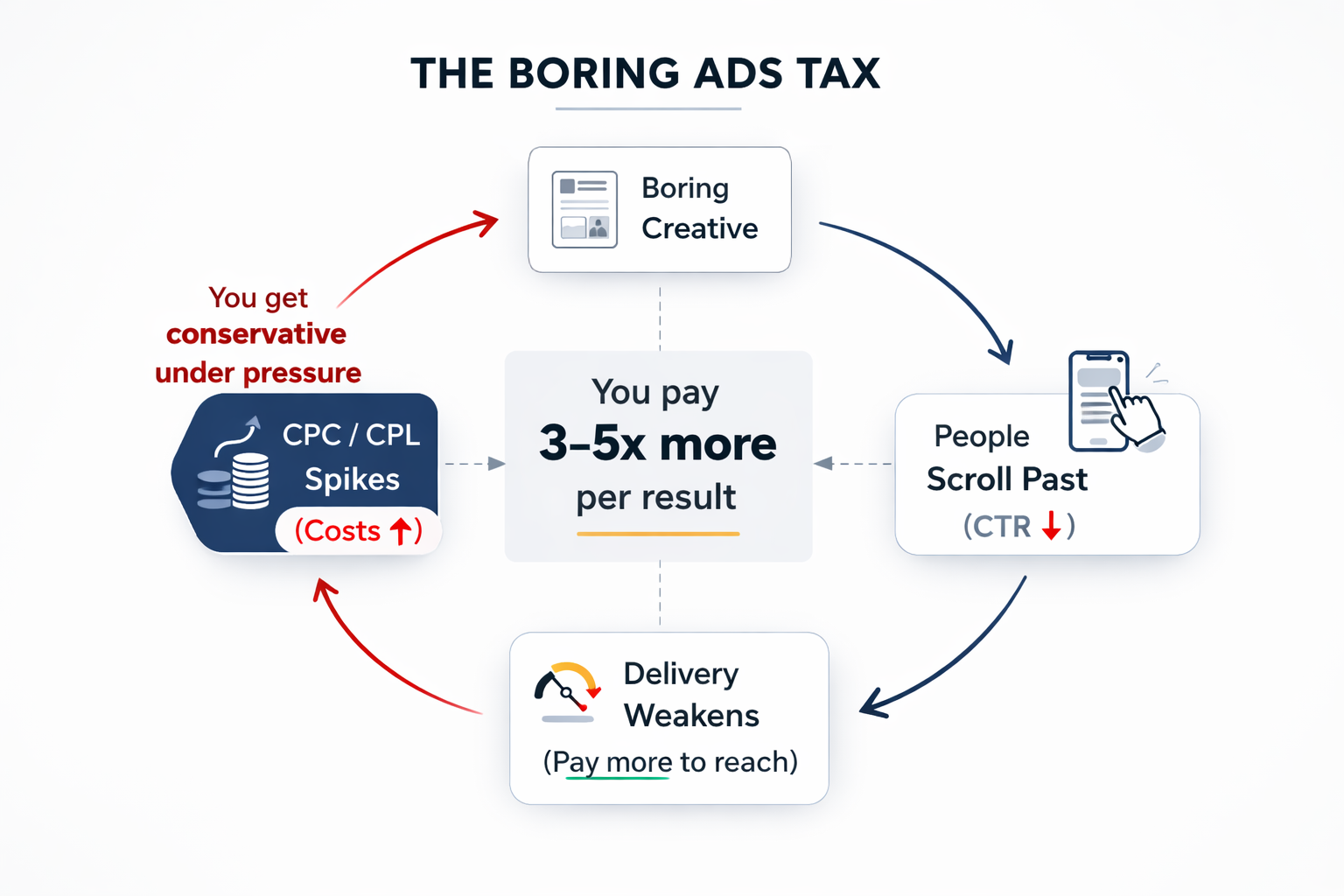
I call it the Boring Ads Tax. When your creative is bland, people scroll past it. Your click-through rate drops. LinkedIn's algorithm deprioritises your ads. You need to bid higher to get impressions. So the same ad that a competitor is running for £8 per click costs you £25. Not because LinkedIn is expensive. Because your ad is invisible.
The fix isn't a bigger budget. It's better creative. An ad that actually says something. That calls out a specific pain point. That feels like a person wrote it, not a brand guidelines document.
The best-performing B2B ads I've ever run looked nothing like "professional marketing." They looked like something a frustrated founder would post on LinkedIn at 11pm after a bad quarter. Raw. Specific. Slightly uncomfortable. That's what stops the scroll.
"The Boring Ads Tax means bland creative costs you 3-5x more per result. Not because LinkedIn is expensive. Because nobody can see your ad."
What to do instead
Write ads that sound like a person, not a press release. Short sentences. Direct language. Specific numbers.
Call out a pain point your ICP actually has. "Still chasing procurement for that PO?" beats "Streamline your procurement workflow" every time.
Use real photos. Your face. Your office. Your product. Not stock photos of people in suits shaking hands.
Test video. Even a 30-second talking-head video filmed on your phone will outperform most polished corporate creative.
Go deeper: How to Create Scroll-Stopping Ads for "Boring" B2B Industries
Want scroll-stopping LinkedIn ads?
Let's build creative that actually converts. Book a call.
Right. Now for the good stuff.
Those were the traps. The stuff that quietly drains your budget while LinkedIn smiles. Now here are five things about LinkedIn Ads that most people completely miss. These are the opportunities hiding in plain sight.
7. You can build a target account list for free in 10 minutes.
Most advertisers set up broad targeting by industry and job title and wonder why they're wasting budget on companies that would never buy. Meanwhile, you could be showing ads exclusively to the 200 companies on your dream client list.
The power of company list targeting is that you upload a specific list of companies, then segment down by job title. Now you're only showing ads to the exact decision-makers at the exact companies you want as clients. Nobody else sees them. Nobody else pays for them.
Where do you get these lists? Three ways:
1. Your CRM. Export your dream accounts. Your existing pipeline. Companies you've quoted but not closed. Past clients you want to re-engage. You already have this data. Put it in a CSV and upload it.
2. Manual research on LinkedIn. Search for companies in your target industry. Browse LinkedIn company pages. Look at who your competitors are connected to. Build a list of 100-200 dream companies and type them into a spreadsheet. It takes 10-15 minutes.
3. Build directly in LinkedIn Ads. Inside Campaign Manager, you can manually build company audiences by searching for and adding companies one by one, or by filtering by industry, size, and geography. No spreadsheet needed.
This is the closest thing to cold outreach without the cold outreach. You're not sending awkward InMails. You're not cold calling. You're just... appearing in their feed. Every day. With something relevant to say. And they can't tell you're specifically targeting them.
It's the single most underused feature on the platform.
"You can show ads exclusively to your dream clients. Only them. Nobody else. And it costs you nothing extra to set up. Most advertisers don't even know this exists."
3 ways to build your target account list
Your CRM
Export dream accounts, pipeline, past clients
LinkedIn Research
Browse company pages, build a dream list manually
Campaign Manager
Build audiences directly inside LinkedIn Ads
Then layer on job titles to reach the exact decision-makers.
How to do it
Export your dream accounts from your CRM into a CSV (company name + website URL is all you need).
Or spend 10 minutes researching companies on LinkedIn and building a list of 100-200 targets manually.
Upload the CSV to Campaign Manager under "Matched Audiences," or build audiences directly inside the platform.
Layer on 2-3 job titles. Now you're reaching the exact decision-makers at your dream accounts.
Go deeper: Upload Company Lists to LinkedIn Ads [2026 Guide]
8. You can see exactly which companies are engaging with your ads.
This is the one that makes people's jaws drop. Inside LinkedIn Campaign Manager, there's a report called the Company Engagement Report. And it does something no other ad platform on earth can do.
It shows you impressions, clicks, engagements, and leads broken down by individual company name.
Let that sink in. You can literally see that Acme Corp saw your ad 47 times, clicked 3 times, and engaged twice. That Smith Engineering had 120 impressions but zero clicks. That Henderson Consulting clicked 8 times this month and downloaded your case study.
You're not guessing which companies are interested. You're looking at proof. Real data. Company by company.
And here's what makes this genuinely game-changing for sales teams. You can take that data and hand your sales team a warm list. "These 15 companies have been engaging with our content for the last 30 days. They've seen our ads dozens of times. They've clicked. They're interested. Call them."
That's not a cold call anymore. That's a warm call to someone who already knows your name, has seen your proposition, and has actively engaged. Your sales team will love you for it.
But wait. It gets better. It works for organic content too.
Not just paid ads. Your organic LinkedIn posts also feed into this report. So if you're posting regularly and running ads, you get a combined view of which companies are paying attention to you across everything. Paid and organic. In one place.
Cross-reference this against your target account list and you can literally watch your pipeline warming up in real time. "We uploaded 200 dream accounts. 34 of them have engaged in the last 30 days. Here are their names." Try doing that on Meta. Or Google. You can't.
Most advertisers have no idea this exists. They run campaigns, look at aggregate metrics, and wonder whether they're reaching the right people. Meanwhile, the answer is sitting in a report they've never opened.
"LinkedIn will show you exactly which companies are engaging with your ads. By name. With data. No other platform does this. It's like having a CRM that fills itself in."
47
Impressions
Acme Corp
8
Clicks
Henderson Consulting
34
Accounts engaged
Out of 200 target companies
How to use it
In Campaign Manager, go to "Plan" → "Company Engagement Report." It's there. Free. Built in.
Filter by your target account list to see which dream clients are engaging.
Export the data monthly and share it with your sales team as a warm prospect list.
Cross-reference paid and organic engagement to identify accounts that are truly warming up.
Use this data to prioritise outreach. A company that's seen your ads 50 times is a warmer conversation than a cold call.
9. You can spy on every competitor's ads for free.
This one blows people's minds when I show them. LinkedIn has an Ad Library. It's completely free. And it lets you see every single ad that any company is currently running on LinkedIn.
Every. Single. Ad.
Go to any company's LinkedIn page. Click "Posts." Filter by "Ads." Done. You can see their creative, their copy, their call to action. You can see if they're running video or static. You can see if they changed their messaging last month. You can see how many ads they're running simultaneously.
And here's why this matters. Before you spend a penny on your own ads, you can see exactly what your competitors are doing. What angles they're using. What offers they're pushing. What their ads look like.
Then you do something different. If every competitor is running safe corporate ads with stock photos and "innovative solutions" copy, you show up with a raw talking-head video and a specific pain point. You'll stand out like a flare in a dark room.
Most companies never check. They create ads in a vacuum. They have no idea what their ICP is already seeing in their feed. That's like writing a sales pitch without knowing what the competition is offering. Insane.
"Before you spend a penny, go look at your competitors' ads. See what they're saying. Then say something completely different. That's free competitive intelligence most companies never use."
How to do it
Go to your competitor's LinkedIn company page.
Click "Posts" then filter by "Ads." You'll see everything they're running.
Note the patterns: what format, what messaging, what offer. Then differentiate.
Do this for your top 5 competitors before you write a single ad. It takes 15 minutes and it's the best 15 minutes you'll ever spend.
Ready to stop guessing and start targeting?
Book a call. I'll show you exactly who to target, how to reach them, and what to say.
10. The retargeting goldmine nobody uses.
Here's a stat that should make you uncomfortable. 95-97% of people who visit your website leave without doing anything. No form fill. No phone call. No email. They looked at your site and left.
And most B2B companies just... let them go. Gone forever. No follow-up. No retargeting. Nothing.
That's insane. Those people were interested enough to visit your site. They were evaluating you. And you let them walk away without a word.
A £10-15/day LinkedIn retargeting budget is the highest-ROI spend on the platform. Full stop. You're showing ads to people who already know who you are. They've been on your site. They've seen your proposition. Now you're staying in their peripheral vision while they make a decision.
And here's the beautiful part: it creates the illusion of omnipresence. When someone visits your site and then sees your ads on LinkedIn, then sees another ad next week, then another. They start thinking "these guys are everywhere." They're not. You're just retargeting them for pennies.
Your competitor who seems to "be everywhere"? They're probably spending £300 a month on retargeting to a tiny warm audience. That's it. That's the whole trick.
"£10-15/day on LinkedIn retargeting creates the illusion of omnipresence. Your prospects think you're everywhere. You're spending less than a round of coffees."
The Retargeting Funnel
1,000 website visitors
950–970 leave
No form fill. Gone.
30–50
Convert
Retargeting brings them back
£10–15/day = omnipresence for pennies
How to do it
Install the LinkedIn Insight Tag on your website. Takes 5 minutes with Google Tag Manager (see our step-by-step guide below).
Create a retargeting audience of all website visitors in the last 90 days.
Run a small, always-on retargeting campaign. £10-15/day. Case studies. Testimonials. Proof of results.
Watch your "we keep seeing you everywhere" comments increase. That's the signal it's working.
📘 Need help installing the Insight Tag? Follow our complete LinkedIn Ads Tutorial for Beginners
Step-by-step guide covering setup, tracking, and everything else from scratch.
Go deeper: B2B Retargeting Strategy: The 10% Fix That Doubled Sales Calls
Want LinkedIn Ads that actually work?
I help small niche B2B companies get more leads from LinkedIn without wasting budget on the wrong things. Book a free call and I'll show you what's broken and how to fix it.
Watch Free B2B Ad Tutorials
Campaign breakdowns, creative strategy, and LinkedIn Ads walkthroughs — straight from a practitioner, not a guru.
James Green | Ads for B2B
Free B2B advertising tutorials, LinkedIn Ads breakdowns, and creative strategy