

LinkedIn Ads Tutorial for Beginners (2026)
Everything you need to set up and launch your first LinkedIn Ads campaign. No prior experience required.
James Green
Based on auditing 100+ LinkedIn ad accounts and managing £2M+ in B2B ad spend
Who This LinkedIn Ads Tutorial Is For
This guide is for anyone who has never run a LinkedIn ad before. Maybe you're a B2B business owner tired of cold outreach. Maybe you're a marketing manager who's been told to "figure out LinkedIn Ads." Maybe you've tried LinkedIn Ads once and watched your money vanish.
Whatever brought you here, I've written this to be the guide I wish I'd had when I started. No fluff. No marketing theory. Just exactly what to click, what to avoid, and what actually works.
What You'll Learn
- 1.Create your LinkedIn Ads account – from scratch, step by step
- 2.Navigate Campaign Manager – so you're not clicking blindly
- 3.Choose the right campaign objective – because LinkedIn's defaults waste money
- 4.Target the right people – with real B2B examples
- 5.Set budgets and bids – without burning money on defaults
- 6.Create your first ad – with copy that actually works
- 7.Set up tracking – so you know what's converting
- 8.Avoid the mistakes – that kill most beginner campaigns
By the end, you'll have your first LinkedIn Ads campaign live and tracking properly.
Before You Start: Prerequisites
LinkedIn Company Page
Required for advertising. Free to create.
Website with landing page
Somewhere to send your traffic.
£10-30/day budget
Minimum viable test budget.
Want expert guidance before you start?
Book a free call and I'll help you plan your first campaign.
Watch: LinkedIn Ads Tutorial for Beginners
Full 42-minute walkthrough covering everything from account setup to your first campaign launch.
Video Chapters
How Much Do LinkedIn Ads Cost in 2026?
LinkedIn is the most expensive major ad platform. But for B2B, it's often the only place you can reach decision-makers by job title, seniority, and company.
LinkedIn Ads Benchmarks UK 2026
Full breakdown of CPC, CPM, CPL by industry, ad format, and region. Interactive charts and expert commentary on what "good" actually looks like.
See Full BenchmarksWhat Affects Your Costs?
| Factor | Impact on Cost |
|---|---|
| Audience Size | Smaller audiences = higher CPM. Broader = cheaper but less targeted. |
| Targeting Specificity | C-suite targeting costs more than junior roles. Premium audiences have premium prices. |
| Industry Competition | SaaS and Finance have highest competition. Manufacturing typically cheaper. |
| Ad Relevance Score | Higher CTR = lower costs. LinkedIn rewards engaging ads. |
| Bidding Strategy | Maximum Delivery spends faster. Manual CPC gives cost control. |
| Time of Year | Q4 costs spike (budget flush). January often cheaper. |
Reality check: If your average deal value is under £5,000, LinkedIn Ads may not be cost-effective. The high CPL only makes sense when leads convert to high-value contracts.
LinkedIn Ads Budget Calculator
Estimate your monthly spend and expected leads based on your targeting and industry.
How LinkedIn Ads Actually Work (Quick Overview)
Before you start clicking buttons, you need to understand the basic structure. LinkedIn's advertising system has a simple hierarchy:
Campaign Manager Structure
Ad Account
Your billing and access control hub
Campaign Groups
Organise campaigns by product or goal
Campaigns
Where you set targeting and budget
Ads
Your actual creative content
How the Auction Works
LinkedIn runs an auction every time someone on the platform could see an ad. Your ad competes against others targeting the same person. Who wins depends on:
- Your bid – what you're willing to pay per click or thousand impressions
- Relevance score – how likely LinkedIn thinks the person will engage with your ad
- Historical performance – how well your past ads have performed
This means better ads can win even with lower bids. Relevance matters.
Key Terms You'll See
CPC (Cost Per Click)
What you pay each time someone clicks your ad
CPM (Cost Per Thousand)
What you pay per 1,000 ad impressions
CTR (Click-Through Rate)
Percentage of people who click after seeing your ad
Impressions
Number of times your ad was shown
Reach
Number of unique people who saw your ad
Conversion
When someone completes your desired action (form, call, etc.)
Step 1: Create Your LinkedIn Ads Account
Setting up your LinkedIn Ads account takes about 10 minutes. Here's exactly what to do:
Ensure You Have a LinkedIn Company Page
You cannot run LinkedIn ads without a Company Page. If you don't have one:
- Go to LinkedIn and click the "Work" icon (top right)
- Select "Create a Company Page"
- Choose "Small Business" or "Company"
- Fill in your company name, URL, industry, and size
- Add a logo and description
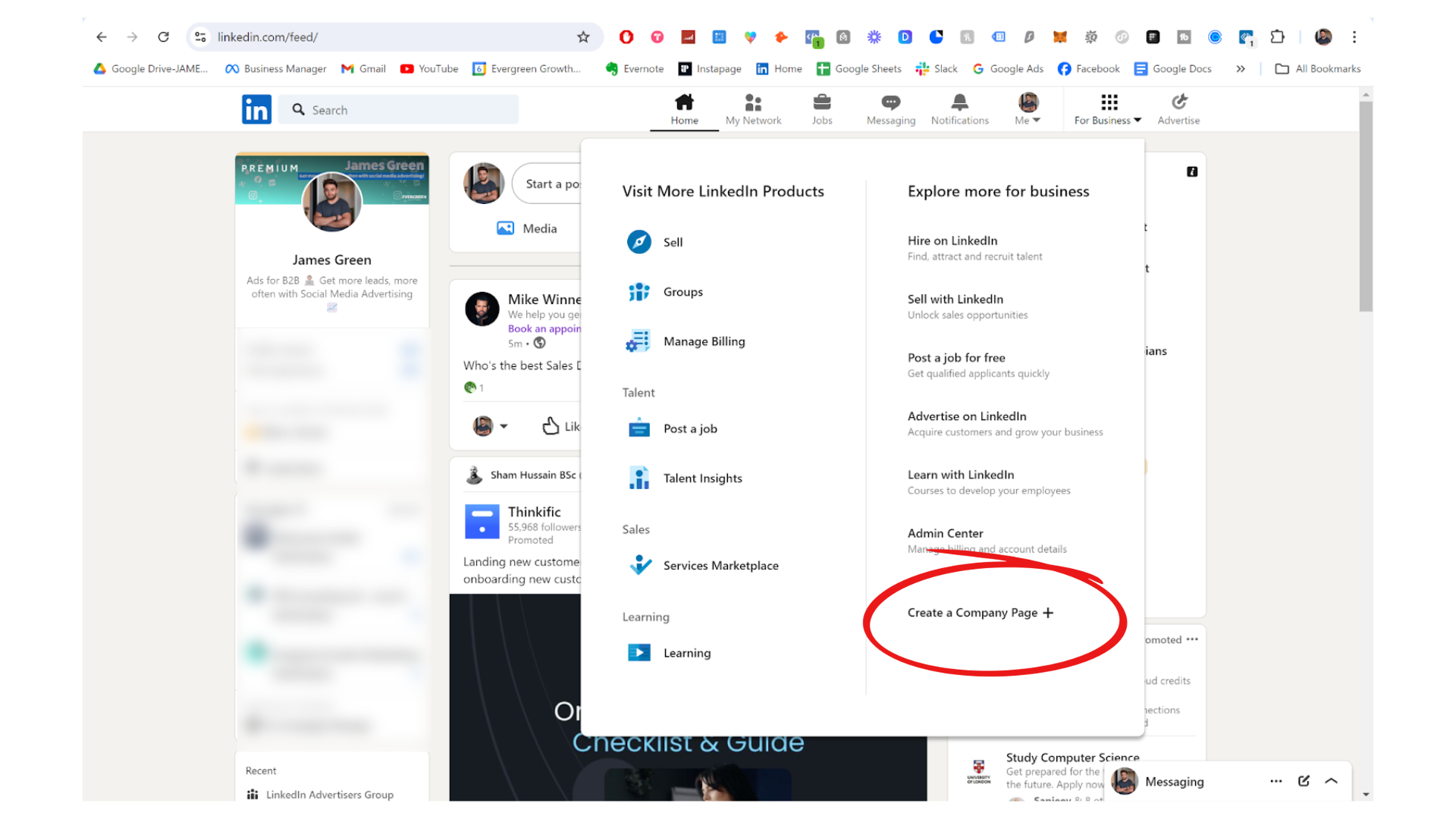
You need to be an admin of the Company Page to run ads on it. Make sure you're listed as a "Super Admin" or "Content Admin."
Access Campaign Manager
Go to linkedin.com/campaignmanager
If this is your first time, LinkedIn will prompt you to create an ad account. Click "Create Account" to proceed.
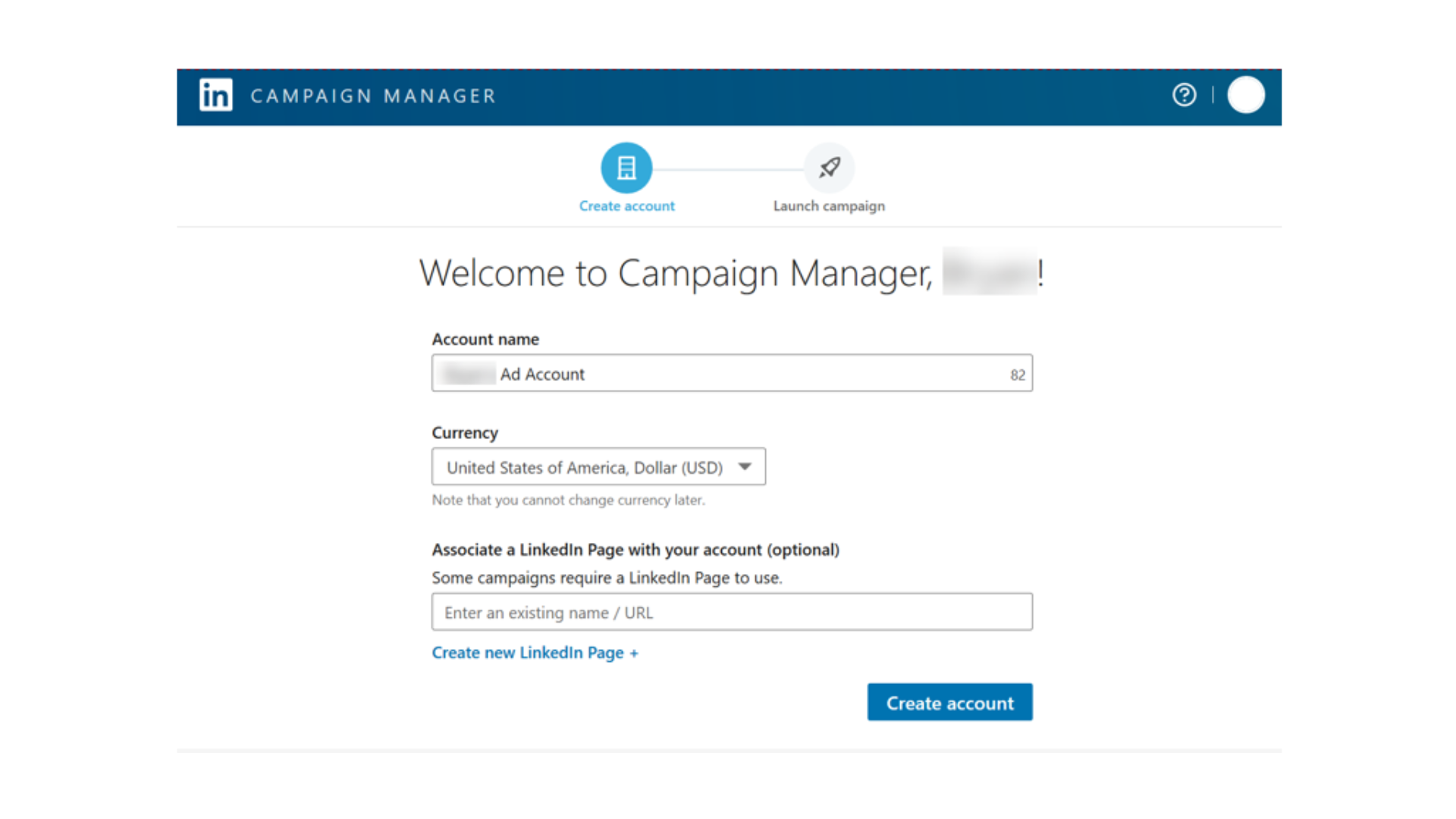
Create Your Ad Account
You'll need to fill in:
- Account name: Usually your company name
- Currency: Choose carefully. You cannot change this later.
- Associated LinkedIn Page: Select your Company Page
Important: Currency cannot be changed after account creation. If you need to bill in a different currency, you'll have to create a new ad account.
Add Billing Details
LinkedIn requires payment details before you can launch any campaign. You can add:
- Credit or debit card
- PayPal (in some regions)
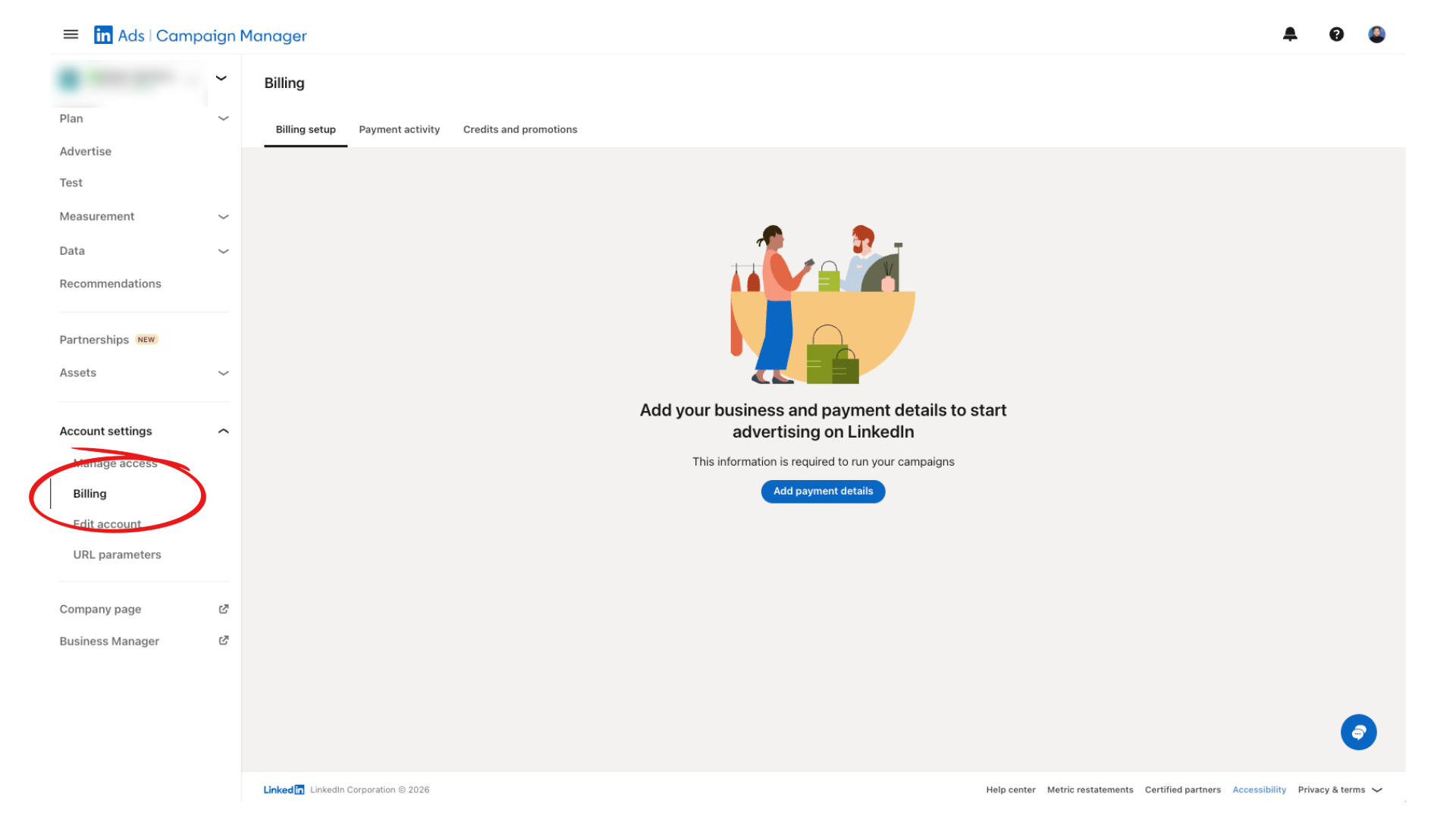
You won't be charged until your first campaign runs. LinkedIn charges when you hit your billing threshold or at the end of each month.
Account Ready
Once you see the Campaign Manager dashboard with your company name at the top, you're ready to create your first campaign.
Step 2: Campaign Manager Walkthrough
Campaign Manager can feel overwhelming at first. Here's a quick orientation so you know where everything lives.
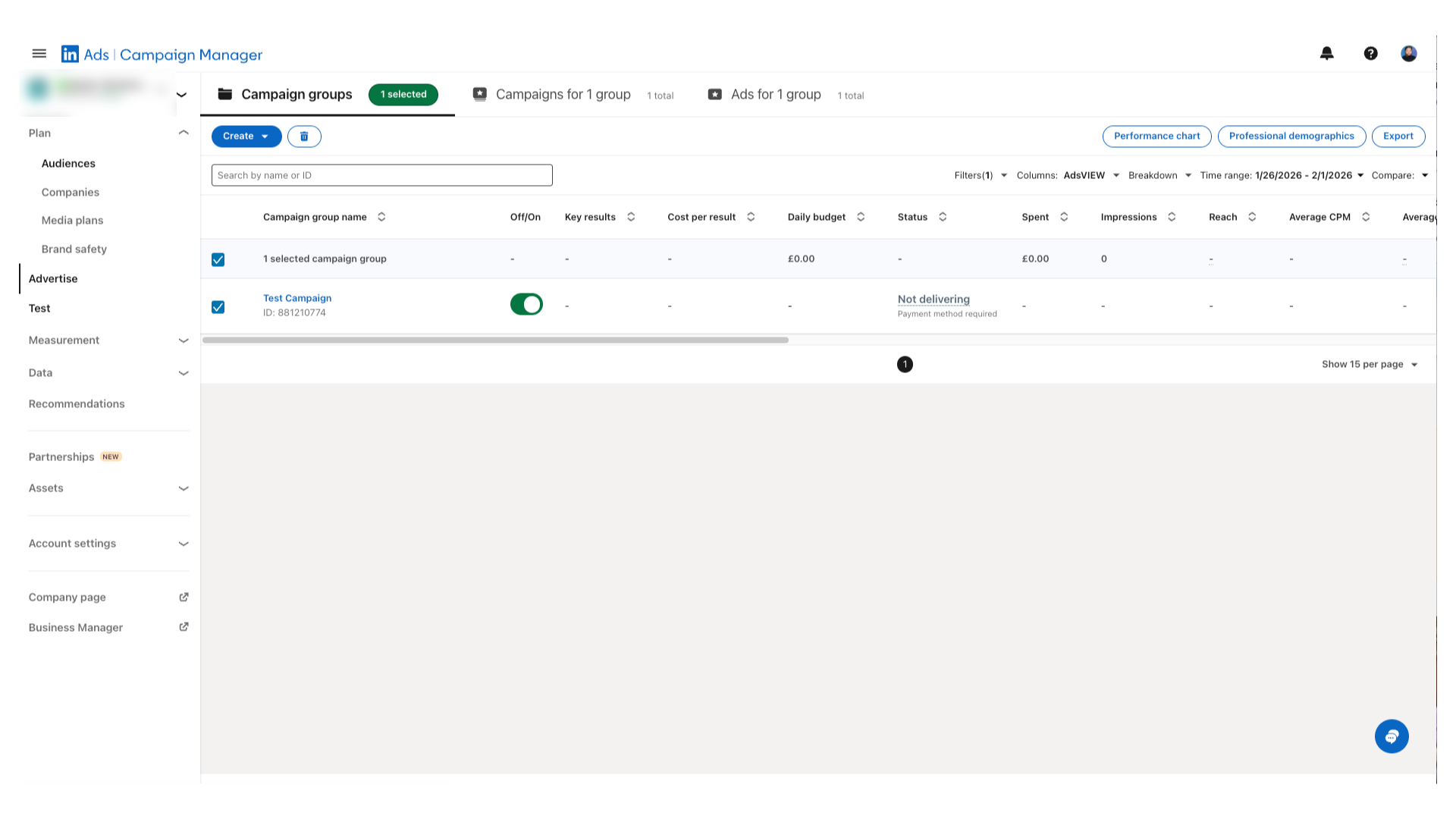
This is where you'll spend most of your time. The main "Advertise" tab shows your Campaign Groups, Campaigns, and Ads in a hierarchical view.
Plan
Where you set up audiences and conversion tracking before launching campaigns.
- Matched Audiences
- Conversions
- Insight Tag
Advertise
The main area where you create and manage campaigns. You'll spend most of your time here.
- Campaign Groups
- Campaigns
- Ads
Analyse
View performance reports, demographics, and website visitor insights.
- Performance Reports
- Demographics
- Website Demographics
Key Locations to Remember
Account Assets (left sidebar)
Upload company/contact lists, create retargeting audiences, and manage your Insight Tag.
Conversions (under Plan)
Set up conversion events so you can track leads and sales from your ads.
Billing Centre (Account Settings)
Update payment methods, view invoices, and set spending limits.
Pro Tip: The Companies View
Under Plan → Companies, you can see exactly which companies are engaging with your ads and organic content. This is powerful for B2B—you can see which target accounts are seeing your ads, even if they haven't converted yet.
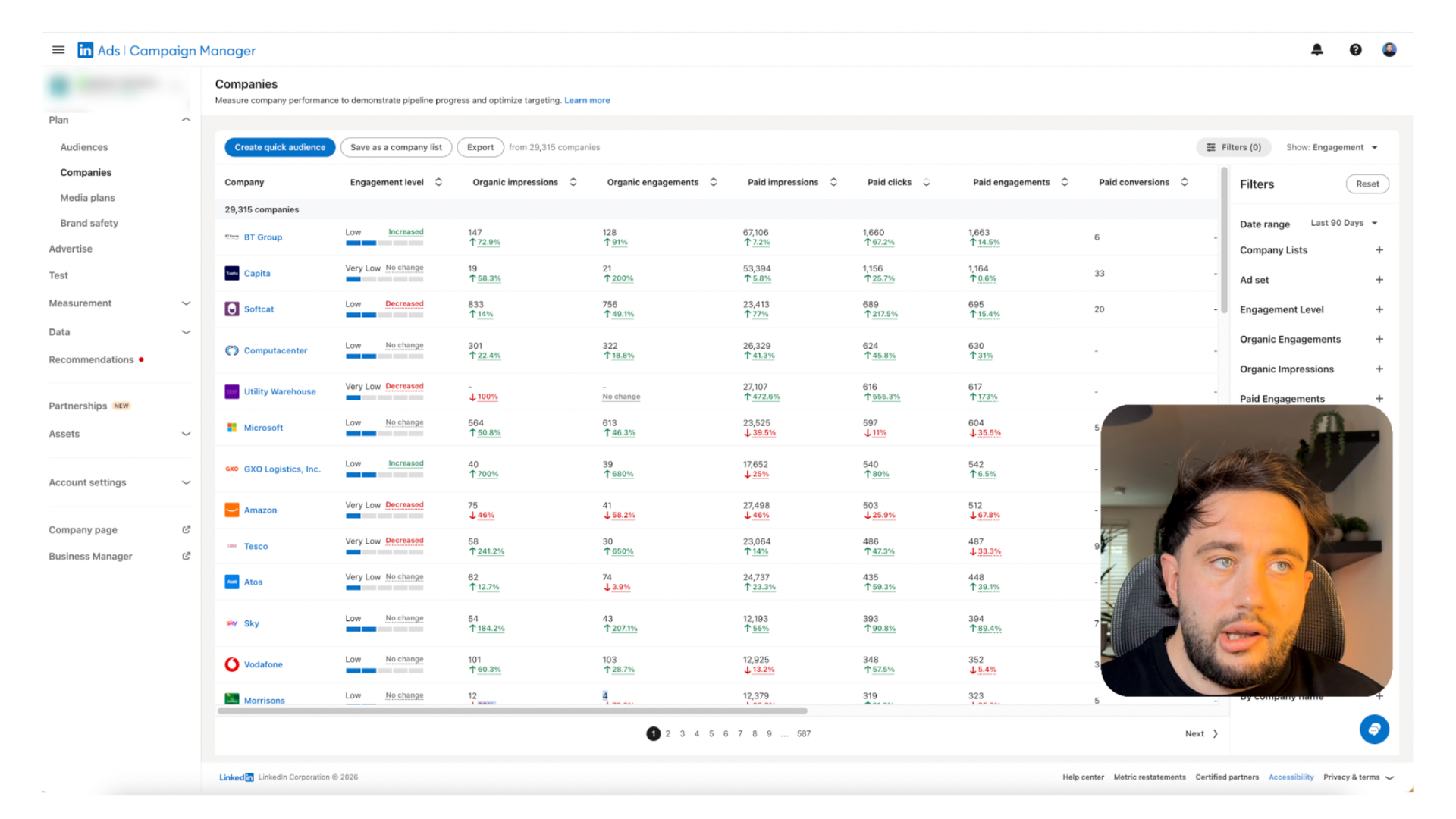
Navigation tip: Click on your ad account name in the top-left to return to the main dashboard at any time. The left sidebar shows all available sections for the current view.
Step 3: Choosing the Right Campaign Objective
LinkedIn asks you to pick an "objective" when creating a campaign. This tells LinkedIn what you want people to do and affects how your ads are optimised and charged.
There are three categories: Awareness, Consideration, and Conversions.
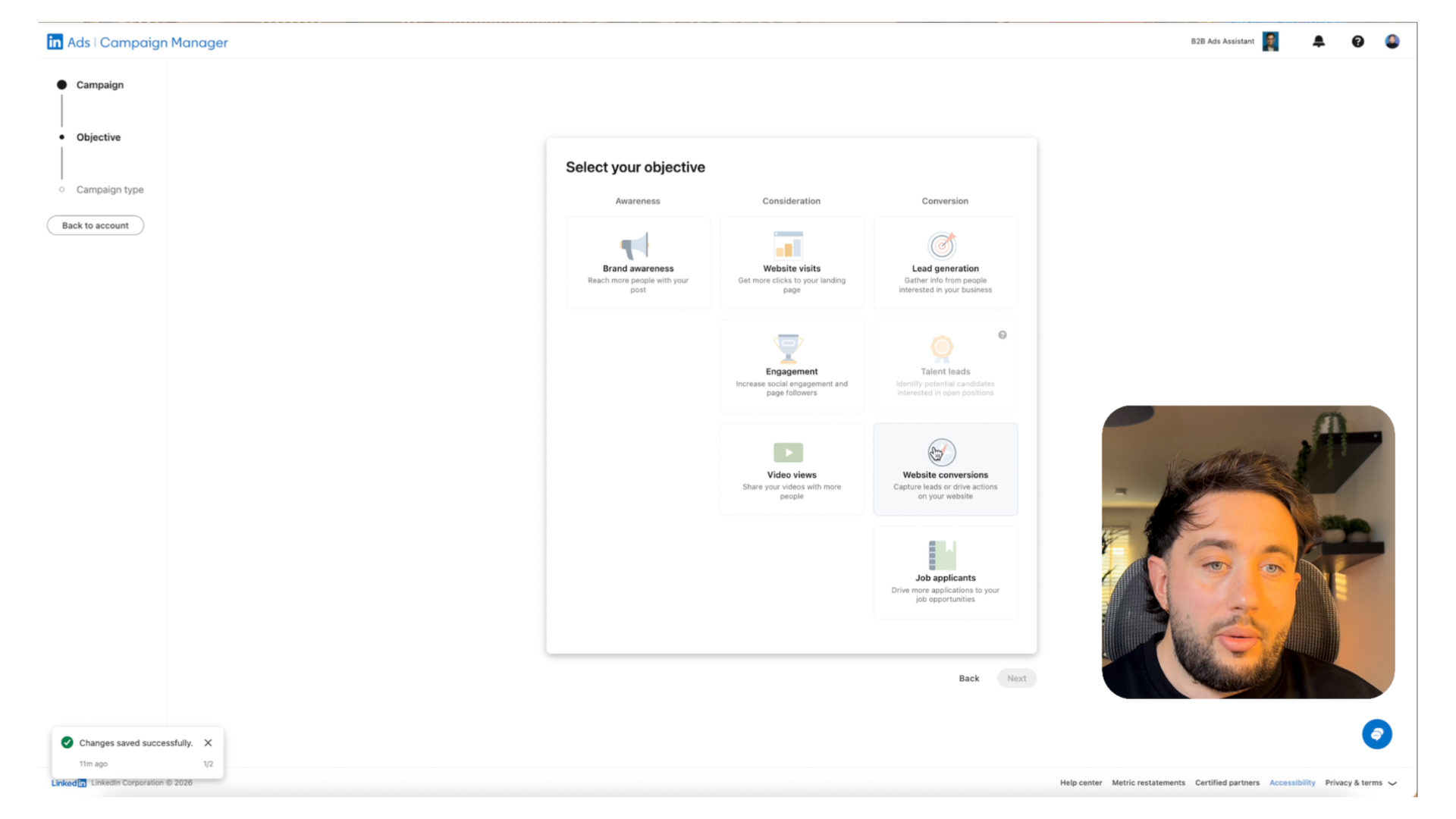
LinkedIn Campaign Objectives Comparison
| Objective | What It Does | Charged By | Best For | Beginner? |
|---|---|---|---|---|
Brand Awareness | Maximises impressions to most people | CPM (impressions) | Large brand campaigns, product launches | ⚠️ Avoid |
Website Visits | Optimises for clicks to your website | CPC (clicks) | Driving traffic to landing pages, blog posts | ✓ Good start |
Engagement | Gets likes, comments, shares on your ad | CPE (engagements) | Content promotion, follower growth | — Skip |
Video Views | Maximises views of your video content | CPV (views) | Building video audiences for retargeting | — Later |
Lead Generation | Uses LinkedIn's built-in lead form | CPL (leads) | Collecting leads directly on LinkedIn | ✓ Consider |
Website Conversions | Optimises for form fills on your website | CPA (conversions) | Driving form submissions, demo requests | ✓ Best |
Beginner Recommendation
Start with Website Visits or Website Conversions. Website Visits is simpler and gives you data faster. Once you have tracking set up and at least 30 conversions per month, switch to Website Conversions for better optimisation.
Avoid Brand Awareness unless you have a big budget and aren't focused on leads. It optimises for reach, not action. Most B2B companies with limited budgets see better results from Website Visits or Lead Generation.
Step 4: Targeting the Right Audience (With Examples)
This is where most people get it wrong. LinkedIn's targeting is powerful, but it's also easy to waste money if you go too broad.
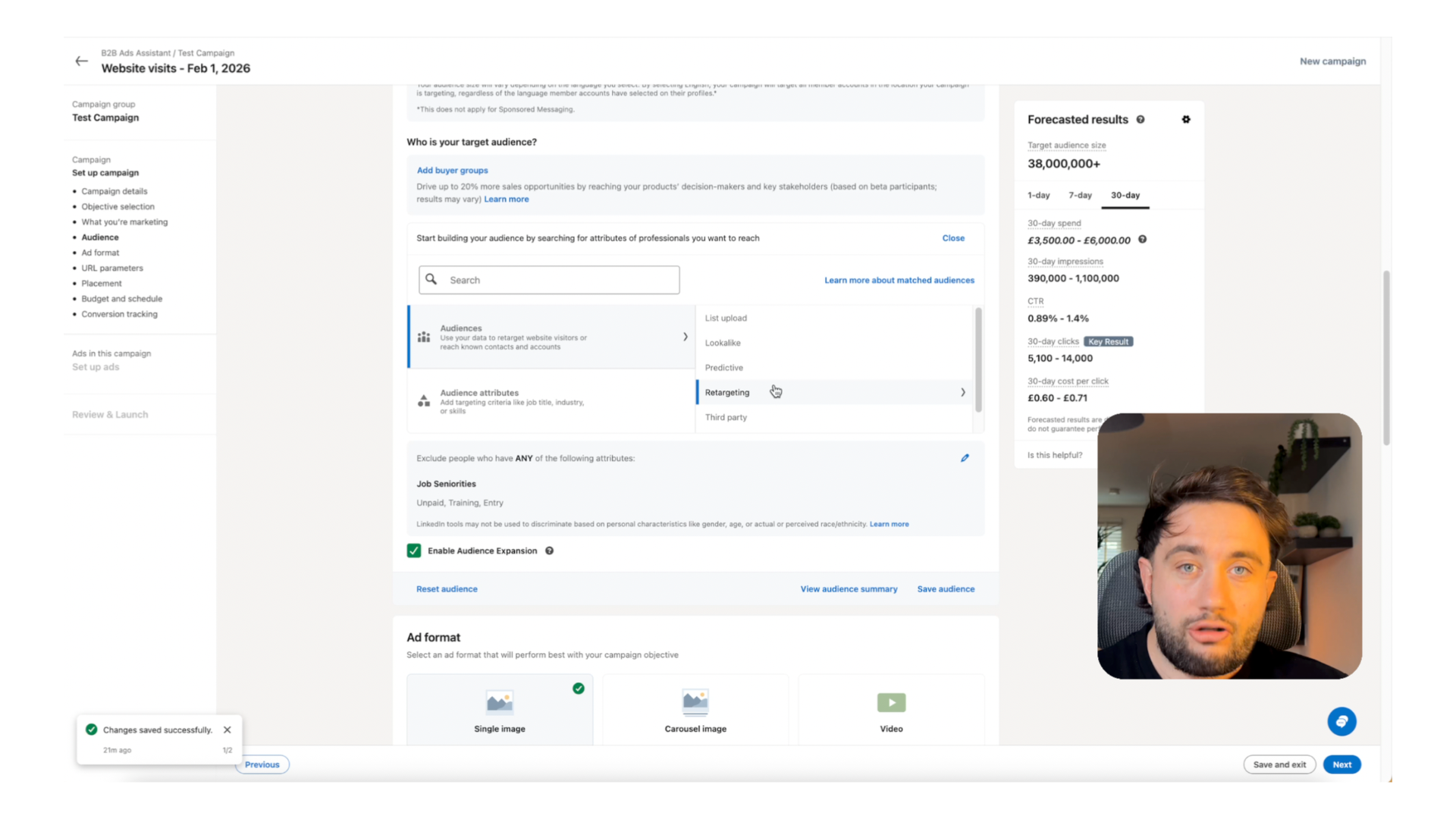
Core Targeting Options
Job Title
Target specific roles like "Marketing Director" or "IT Manager"
Best for: Known buyer personas with clear job titles
Job Function
Target departments like "Marketing" or "Operations"
Best for: Broad awareness within a department
Seniority
Filter by level: Director, VP, C-Suite, etc.
Best for: Reaching decision-makers vs end-users
Company Size & Industry
Target by employee count or sector
Best for: Matching your ideal customer profile
Member Skills & Groups
Target based on listed skills or LinkedIn Group membership
Best for: Niche audiences with specific expertise
Matched Audiences
Upload your own company or contact lists
Best for: ABM campaigns and retargeting
Example: B2B SaaS Company Targeting
Let's say you sell HR software to mid-market companies. Here's how to layer your targeting:
Company Size: 201-500 employees
Filters out companies too small or too large for your solution
Job Function: Human Resources
Focuses on the department that uses your product
Seniority: Director and above
Reaches decision-makers, not individual contributors
Industry: Exclude Staffing & Recruiting
Removes agencies and recruiters from your audience
Result: An audience of 15,000-30,000 HR decision-makers at mid-market companies. Specific enough to be relevant, broad enough to scale.
Audience size tip: Aim for 20,000-100,000 members for most campaigns. Smaller audiences can work for ABM but need higher budgets to get enough delivery. Larger audiences risk being too broad.
Advanced Targeting
Upload Company Lists to LinkedIn Ads
Skip broad targeting entirely. Upload your dream client list and only pay to reach decision-makers at companies you actually want.
Learn Matched AudiencesGo deeper:
Advanced LinkedIn Targeting HacksSecret strategies for behavioural targeting, skills-based audiences, and more.
Targeting getting complicated?
I'll help you build the right audience for your business. Free strategy call.
Step 5: Budgets, Bids & What to Expect
LinkedIn is expensive. That's the reality. But it's expensive because the audience is valuable. Here's how to set up your budget without wasting money on defaults.
£10
Minimum daily budget
£50-150
Typical B2B cost per lead
2-4 weeks
Time to optimise a new campaign
Daily vs Lifetime Budgets
Daily Budget (Recommended)
LinkedIn spends up to your daily limit each day. Easier to control and adjust.
Best for: Testing and ongoing campaigns
Lifetime Budget
LinkedIn paces spend across your campaign's total duration. Less control over daily pacing.
Best for: Fixed-date campaigns (events, launches)
LinkedIn Bidding Strategy Comparison
| Strategy | How It Works | Control | Spend Speed | Best For | Beginner? |
|---|---|---|---|---|---|
| Maximum Delivery | LinkedIn bids automatically to spend your full budget | Low | Fast | Quick tests when you want fast data | ✓ Start here |
| Manual CPC | You set the maximum you'll pay per click | High | Slower | Cost control, experienced advertisers | ✓ After 2 weeks |
| Target Cost | LinkedIn aims for your target cost per result | Medium | Variable | Predictable spend, conversion campaigns | — Advanced |
Beginner tip: Start with Maximum Delivery to get data quickly. Once you have 2 weeks of performance data, switch to Manual CPC to control costs. Set your bid at or slightly above LinkedIn's suggested range.
Realistic Cost Expectations for B2B
- CPC: £4-12 depending on targeting and competition
- CPM: £30-80 for most B2B audiences
- Cost per lead: £50-150 is normal for B2B. Enterprise deals can justify £200+
- CTR: 0.4-0.6% is average. Above 1% is excellent.
Watch out for Audience Network. LinkedIn's default settings include showing your ads on third-party websites and apps outside LinkedIn. This burns budget on low-quality placements.
Make sure to uncheck "Enable the LinkedIn Audience Network" in your campaign settings.
See what happened when a company trusted LinkedIn's defaults (£96K case study)Must Read Before Launch
3 Hidden Traps Killing Your LinkedIn Ads
LinkedIn's default settings waste 30-50% of your budget. Learn exactly which checkboxes to turn off before spending a single pound.
Stop Wasting BudgetStep 6: Creating Your First LinkedIn Ad
Now for the fun part. Your ad creative is what people actually see. Get this wrong and your targeting doesn't matter.
LinkedIn Ad Format Comparison
| Format | Pros | Cons | Best For | Beginner? |
|---|---|---|---|---|
Single Image | Simple, fast to create, proven performance | Limited visual storytelling | Lead gen, quick tests, most campaigns | ✓ Start here |
Video | Higher engagement, builds retargeting audiences | Requires video production | Brand stories, testimonials, explainers | — Later |
Carousel | Multiple messages, higher engagement | More assets to create, can distract | Product features, case studies, multi-step content | — Later |
Document | Preview before download, native experience | Requires strong lead magnet | Reports, guides, checklists, whitepapers | ✓ Consider |
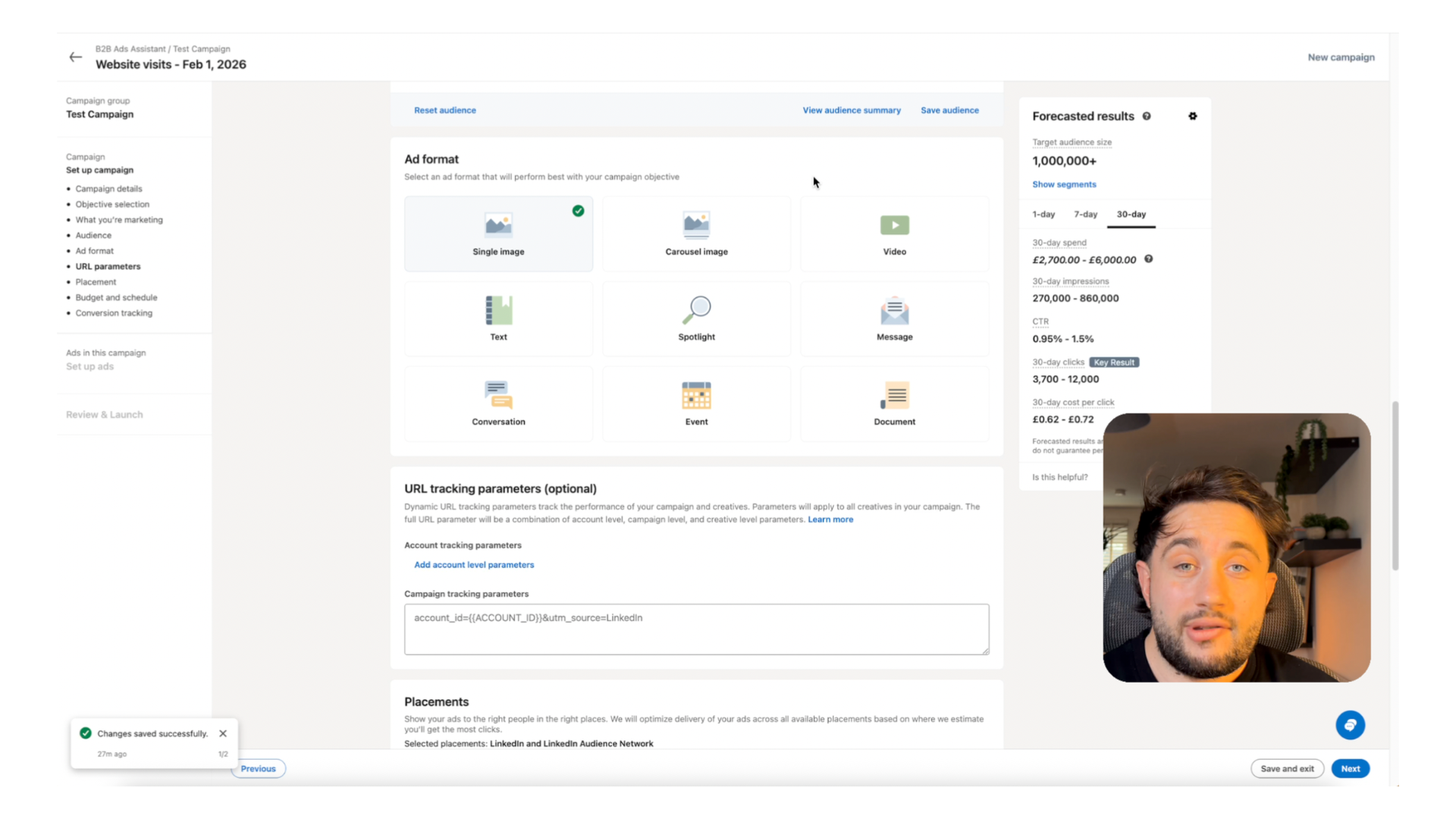
Ad Copy Structure (Single Image)
Intro Text (above the image)
Up to 600 characters. This is your hook. Make it count.
Headline (below the image)
Up to 70 characters. Reinforce the value or create curiosity.
Description (optional)
Up to 100 characters. Not always shown. Keep it short.
CTA Button
Choose from: Download, Learn More, Sign Up, Register, Contact Us, etc.
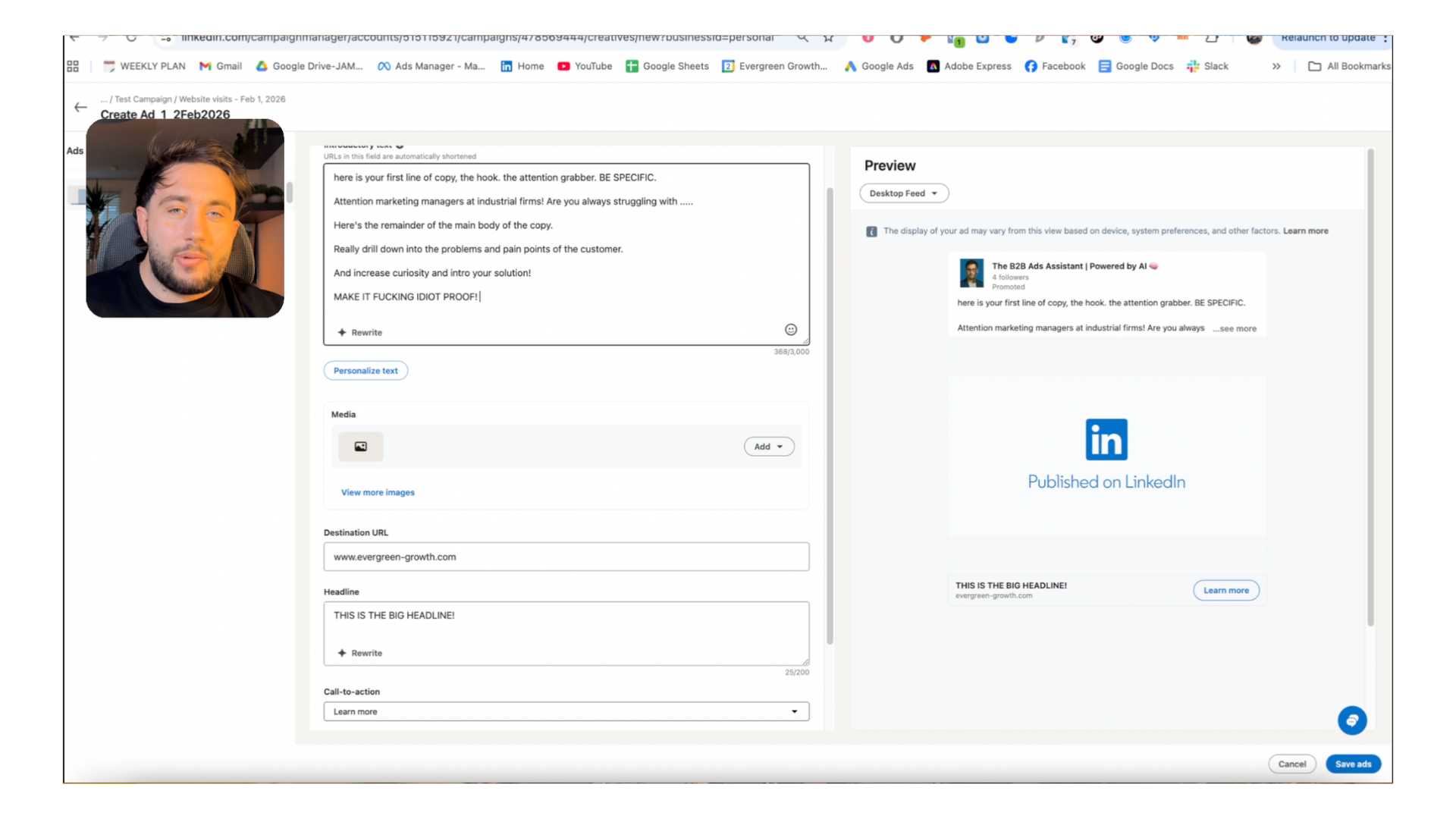
Ad Copy Best Practices
- Lead with a problem. People scroll past benefits. Problems make them stop.
- Be specific. "Save £36k/year" beats "Save money." Numbers and specifics add credibility.
- Call out your audience. "IT Directors:" or "For HR teams of 50-200" makes the right people pay attention.
- Make the offer clear. What do they get for clicking? Be explicit.
- Skip the corporate jargon. Write like a person, not a press release.
Image specifications:
- • Recommended size: 1200 x 627 pixels (1.91:1 ratio)
- • Minimum size: 400 x 400 pixels
- • File types: JPG, PNG, GIF (static only)
- • Max file size: 5MB
Go deeper:
How to Create Scroll-Stopping B2B AdsCreative strategies that make "boring" B2B industries interesting.
Go deeper:
CHAOS & SINK Frameworks for B2B AdsTwo proven frameworks for writing headlines that convert.
Need help with your ad creative?
Let's review your messaging and make sure it resonates.
Step 7: Tracking, Insight Tag & Conversions
Without tracking, you're flying blind. You'll have no idea which ads generate leads and which ones waste money. The LinkedIn Insight Tag is essential for any serious advertiser.
Skip this and you'll regret it. I've audited accounts with £50k+ spend and no conversion tracking. They had no idea what was working. Don't be that person. Set this up before you launch.
Track Website Visitors
See who visits your site after clicking or viewing your ads.
Build Retargeting Audiences
Create audiences of people who visited specific pages on your site.
Track Conversions
Attribute leads and sales back to specific campaigns and ads.
Quick Setup Overview
- 1
Get your Insight Tag code
Campaign Manager → Account Assets → Insight Tag → Copy the code
- 2
Install on your website
Add the code to every page, ideally via Google Tag Manager or your website's header section
- 3
Verify it's working
Return to Campaign Manager. The Insight Tag status should show "Active" within 24 hours.
- 4
Set up conversion events
Campaign Manager → Conversions → Create a conversion → Choose page load or event-based tracking
Complete Guide
Complete Tracking Pixels Setup Guide
Install LinkedIn, Meta, and Google tracking all at once using Google Tag Manager. Step-by-step walkthrough with screenshots.
Set Up All Your TrackingLinkedIn-specific guide:
LinkedIn Insight Tag Setup Guide [2026]Detailed walkthrough with screenshots for every installation method.
Common LinkedIn Ads Mistakes Beginners Make
After auditing hundreds of LinkedIn ad accounts, I see the same mistakes over and over. Here are the five that kill most beginner campaigns:
Mistake #1: Audience Network left ON
LinkedIn shows your ads on third-party websites and apps by default. These placements are cheap but low quality. They inflate your impressions while wasting budget on people not actively on LinkedIn.
Fix: Uncheck 'Enable the LinkedIn Audience Network' in campaign settings.
Mistake #2: Audience Expansion enabled
This setting lets LinkedIn show your ads to people outside your targeting criteria 'if they're likely to engage.' Translation: people who click on everything but never buy.
Fix: Uncheck 'Enable Audience Expansion' before launching.
Mistake #3: Targeting too broad
Selecting 'Marketing' as a job function gives you millions of people, from junior coordinators to CMOs. Most aren't your buyers. You end up paying for irrelevant clicks.
Fix: Use specific job titles + seniority + company size. Aim for 20,000-100,000 audience size.
Mistake #4: Boring corporate creative
Stock photos, vague headlines like 'Driving Innovation,' and safe messaging. Nobody stops scrolling for this. Your ads blend into the background noise of LinkedIn.
Fix: Lead with problems. Be specific. Call out your audience. Use real images or bold graphics.
Mistake #5: No conversion tracking
Without the Insight Tag and conversion events set up, you have no idea which campaigns generate leads. You're optimising blind and probably wasting money on the wrong ads.
Fix: Install the Insight Tag and set up at least one conversion event before launching.
Bottom Line
These five mistakes can waste 30-50% of your budget before you even start optimising. Check every one of these settings before you click "Launch Campaign."
Watch the full breakdown:
3 Hidden Traps Killing Your LinkedIn AdsVideo walkthrough with screenshots showing exactly how to fix each trap.
Real-world disaster:
£96K Gone: What Happens When You Trust LinkedIn's Default SettingsCase study: A company's 4-month, £96K campaign that delivered just 3 demos.
Turn it around with retargeting:
How a Large IT Company Doubled Enquiries with 10% Budget ReallocationReallocating just 10% to retargeting doubled their sales calls.
Campaigns running but not converting?
Why Your LinkedIn Ads Aren't ConvertingDiagnostic checklist to identify what's broken in existing campaigns.
Want me to check your setup before launch?
Free campaign audit. I'll catch the mistakes before they cost you.
Watch Free B2B Ad Tutorials
Campaign breakdowns, creative strategy, and LinkedIn Ads walkthroughs — straight from a practitioner, not a guru.
James Green | Ads for B2B
Free B2B advertising tutorials, LinkedIn Ads breakdowns, and creative strategy
FAQs About LinkedIn Ads for Beginners
Ready to Launch Your First Campaign?
You now have everything you need to set up and launch a LinkedIn Ads campaign. But if you want expert eyes on your setup before you spend money, I'm here to help.
- Review your targeting strategy before launch
- Audit your ad creative and copy
- Check your tracking is set up correctly
- Identify budget-wasting settings before they cost you
No obligation. We'll review your setup and give you actionable feedback.
Related LinkedIn Ads Guides
3 Hidden Traps Killing Your LinkedIn Ads
The default settings that waste 30-50% of your budget
Read guideAdvanced LinkedIn Targeting Hacks
Secret strategies for behavioural and skills-based audiences
Read guideLinkedIn Insight Tag Setup Guide
Complete walkthrough for tracking and conversions
Read guideUpload Company Lists to LinkedIn Ads
Target your dream accounts with matched audiences
Read guideWhy Your LinkedIn Ads Aren't Converting
Diagnostic checklist for underperforming campaigns
Read guide