

How to Add a Partner to Meta Business Manager (2026)
Your agency has asked for "Partner access" to your Meta Business Manager. You've opened the settings, clicked around for ten minutes, and nothing looks like the screenshot they sent you. Sound familiar?
Meta changes their interface constantly. Links break. Pages redirect somewhere unexpected. This guide shows you exactly what to click in 2026, with real screenshots and a backup plan for when Meta decides to rearrange the furniture again.
Written by James Green — I've onboarded hundreds of client accounts across Meta, LinkedIn, and Google. This is based on what actually works, not Meta's help docs (which are often out of date).
🚩 You MUST Own Your Ad Account
Before we get into the how, let's talk about something that catches a lot of business owners out. And it costs them dearly.
The Biggest Red Flag in Advertising
If an agency or freelancer says "don't worry, we'll run everything from our account", that is a massive red flag. Walk away.
Here's what happens when you let someone else own your ad account:
- ✗ They leave, and your ad history, pixel data, audience insights, and conversion data go with them
- ✗ You can't see what they're doing with your money
- ✗ Your retargeting audiences belong to them, not you
- ✗ They can hold your account hostage if the relationship goes sour
- ✗ You start from scratch with a new agency. All that learning? Gone.
What Good Looks Like
- ✓ You own the Meta Business Manager
- ✓ You own the ad account, the pixel, and the page
- ✓ Your agency gets Partner access with the permissions they need
- ✓ You can revoke access in seconds if you need to
- ✓ Switch agency tomorrow and keep everything you've built
That's why this guide exists. You're about to set up Partner access the right way, so your data stays yours and your agency can do their job properly.
Why Use Partner Access (Instead of Sharing Your Login)?
The biggest mistake business owners make is emailing their Facebook password to their agency. It happens more than you'd think. And it's completely unnecessary.
Partner Access (Do This)
- • Business-to-business connection
- • Revoke access instantly
- • Granular permissions per asset
- • No shared passwords
- • Full audit trail
Sharing Login (Never Do This)
- • Account takeover risk
- • Cannot limit access
- • No audit trail
- • Violates Meta's terms
- • Can trigger account lockouts
Already running Facebook Ads for B2B? Read our complete Facebook Ads for B2B guide to make sure your campaigns are set up properly once your partner has access.
Before You Start
You'll Need:
- Admin access to your Meta Business Manager (sometimes called Business Portfolio now)
- Your partner's Business ID (a long number they should send you)
- A desktop computer (seriously, don't try this on your phone)
Heads up: Meta links break regularly. We show the full URL throughout this guide so if a link dumps you on the wrong page, you can type the address in manually.
Step-by-Step: Add a Partner to Meta Business Manager
1Open Business Settings → Partners
Go to business.facebook.com/settings/partners in your browser.
If that link doesn't load the right page (and with Meta, it often won't), go to business.facebook.com/settings and click "Partners" in the left sidebar under "Users".
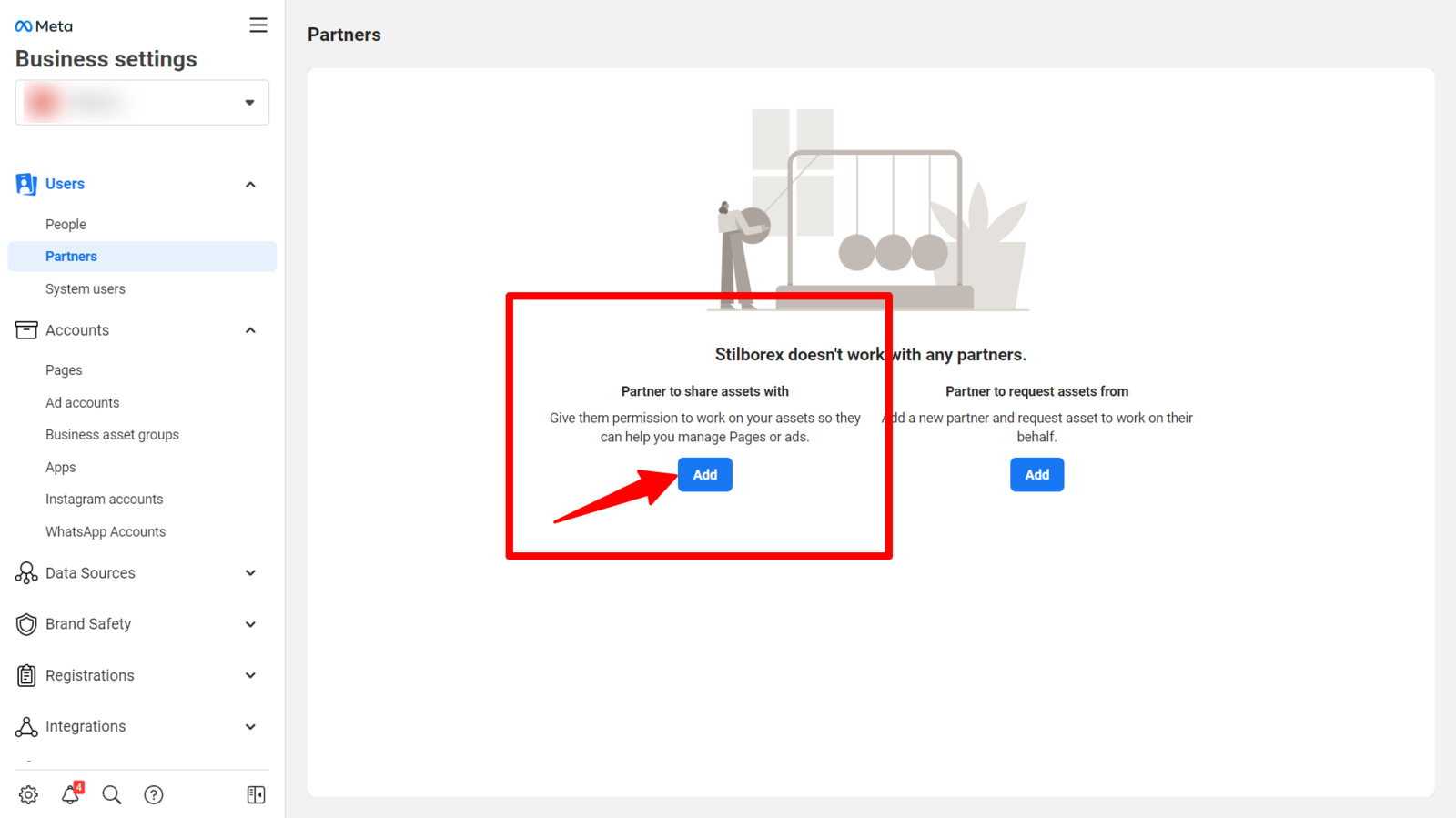
2Click "Add" and Select Partner Type
Click the blue "Add" button. You'll see a dropdown. Select "Give a partner access to your assets".
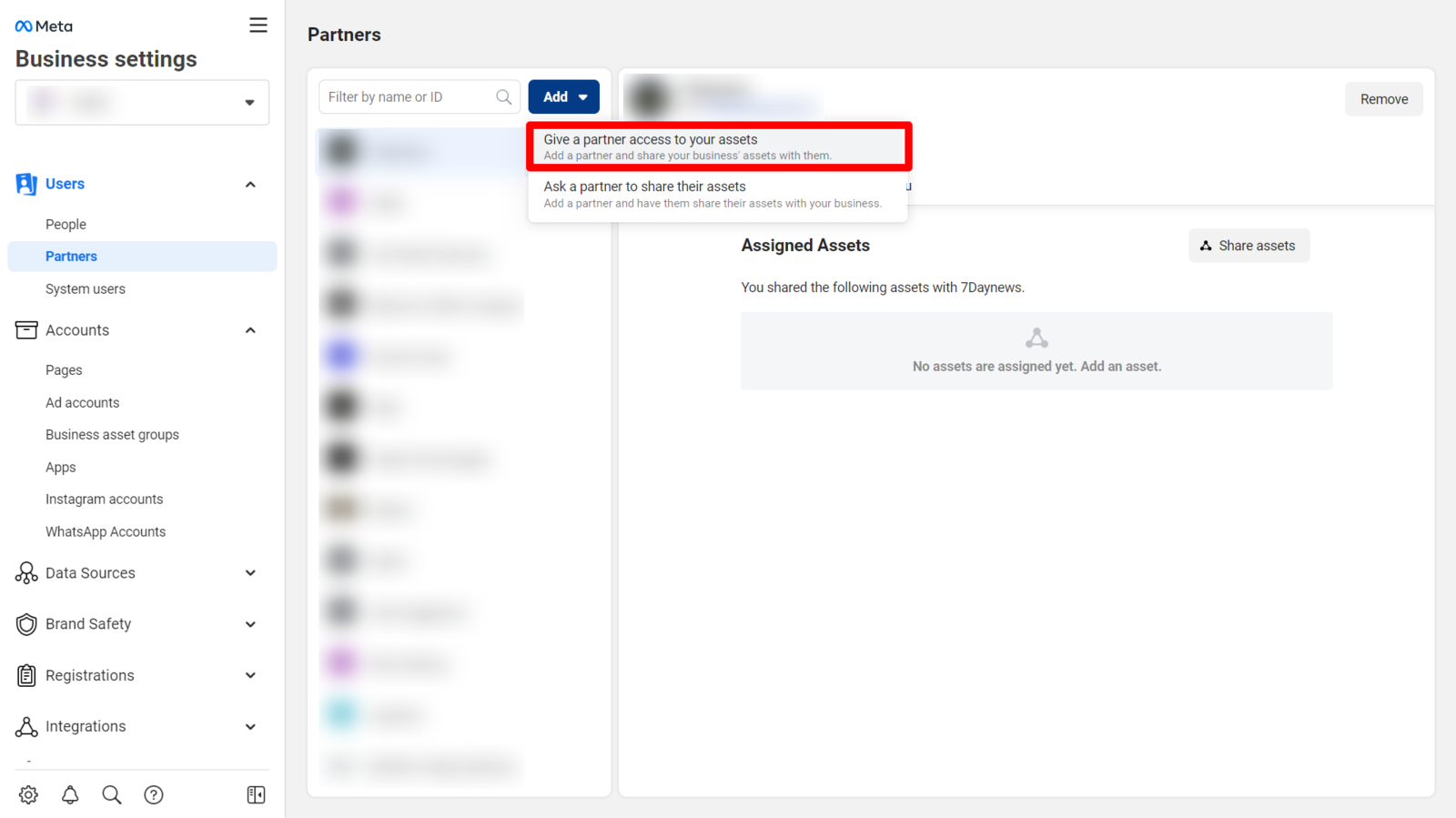
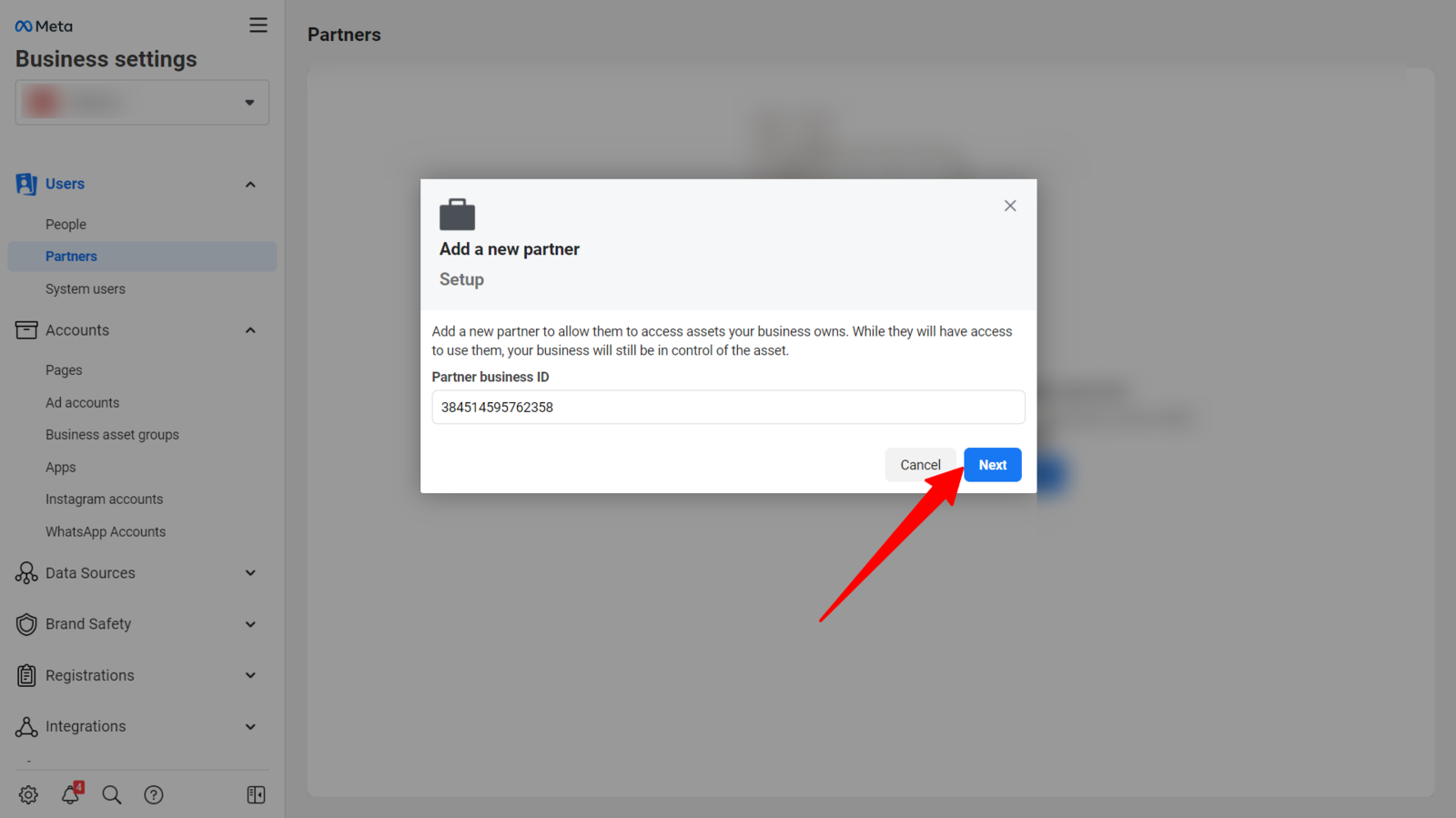
3Enter the Partner's Business ID
Your agency should give you their Business ID. It's a long number (something like 123456789012345). Paste it in and click Next.
Where does the partner find their ID? They go to business.facebook.com/settings → Business Info. The ID shows there or in the URL.
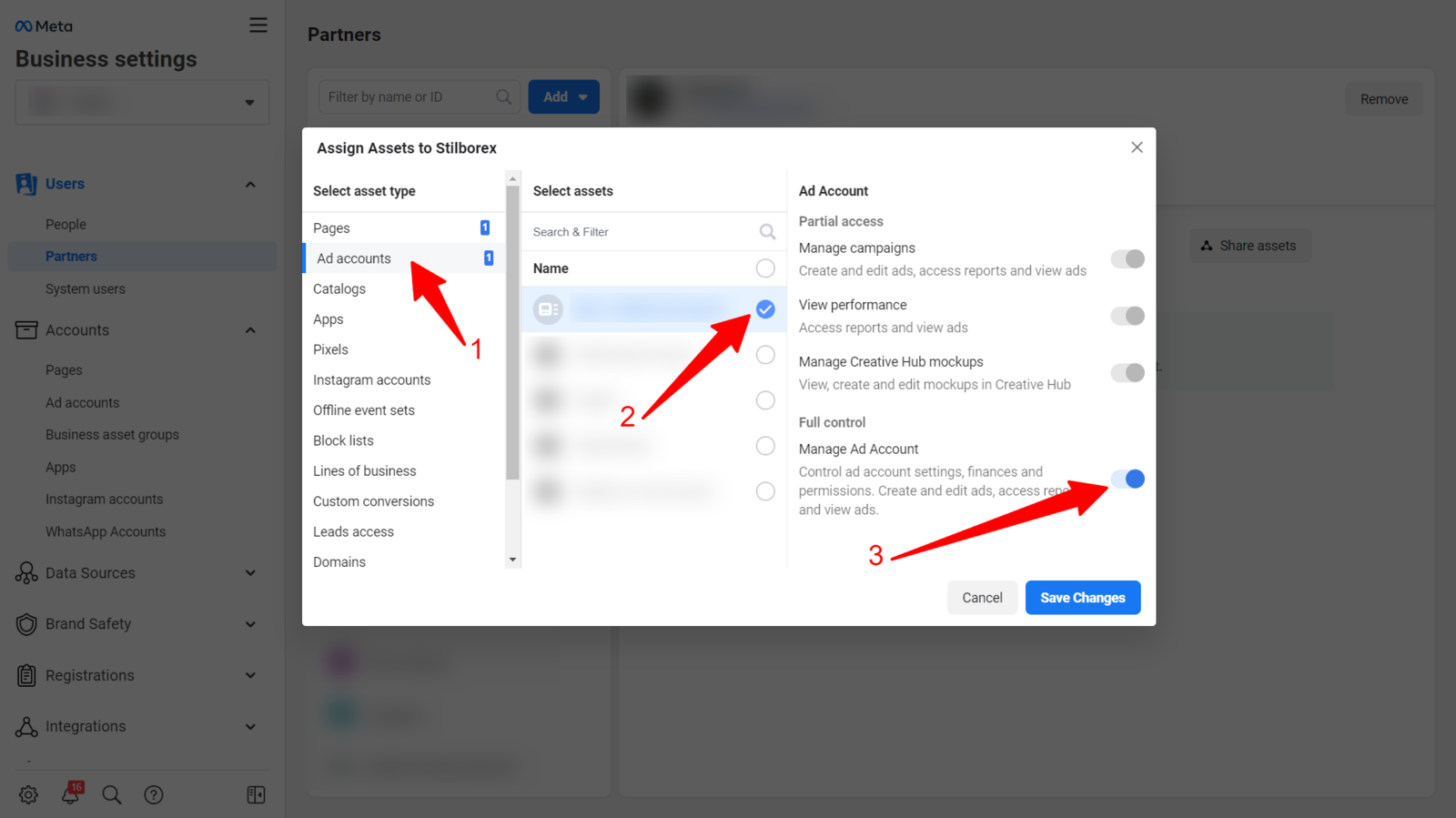
Assign Ad Accounts, Pages & Data Sets
After entering the Business ID, Meta asks which assets to share. For a typical agency running your ads, you need to assign three things:
📊 Ad Accounts
Select the ad account(s) your partner will manage. Grant "Manage campaigns" permission so they can create, edit, and optimise ads.
📄 Facebook & Instagram Pages
If your partner will run ads from your page (which is almost always the case), assign your Facebook Page and linked Instagram account. Grant "Create Content" or "Manage" permission.
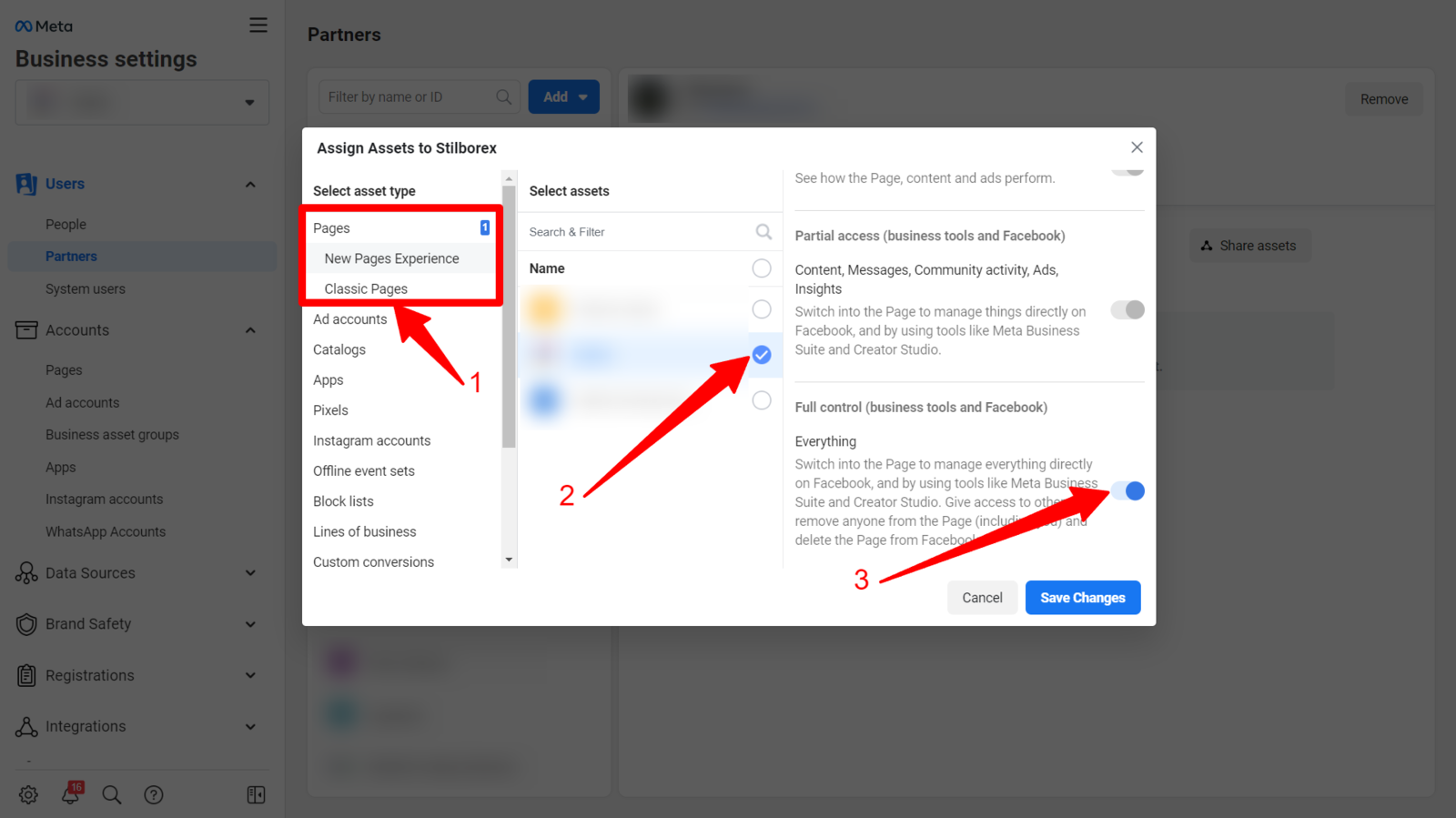
📡 Data Sets (Pixels)
This is the one people forget. In 2026, Meta manages pixels under "Data Sources" as Data Sets. If you only share the ad account but skip the Data Set, your partner can't see conversion data or build retargeting audiences. They'll be flying blind.
This catches people out constantly. If your partner says "I can see the ad account but not the pixel", it's because the Data Set wasn't assigned separately.
Not sure if your pixel is set up correctly? Our Meta Pixel setup guide walks you through installation, testing, and the events you actually need for B2B.
Next Step: Install Your Meta Pixel & Tracking
You've given your partner access. Great. But none of this matters if your tracking isn't set up properly. Without the Meta Pixel firing on your website, your agency is flying blind. No conversion data. No retargeting audiences. No idea what's working.
Meta Pixel Setup Guide
Install and test your Meta Pixel properly. Covers standard events, Conversions API, and the stuff most people skip.
Read the full guideGoogle Tag Manager Setup
If you're using GTM to manage your tags (and you should be), here's how to set it up for B2B tracking across all platforms.
Read the full guideRunning ads on LinkedIn too? You'll also want the complete tracking pixels guide which covers Meta Pixel, LinkedIn Insight Tag, and Google tags all in one place.
Troubleshooting: Partner Method Not Working?
Look, Meta's interface is unpredictable. If the Partners page won't load properly, or you can't find the right settings, here's a backup approach. Instead of adding a partner from the Partners page, you assign them from each individual asset:
Alternative: Assign from the Ad Account Level
- Go to business.facebook.com/settings/ad-accounts
- Select the ad account you want to share
- Click "Assign Partner"
- Enter the partner's Business ID
- Choose the permission level and confirm
If the link doesn't work, go to business.facebook.com/settings → Accounts → Ad Accounts in the left sidebar.
Alternative: Assign from the Page Level
- Go to business.facebook.com/settings/pages
- Select your Facebook Page
- Click "Assign Partner"
- Enter the partner's Business ID and choose permissions
Manual route: business.facebook.com/settings → Accounts → Pages.
Alternative: Assign from the Data Set (Pixel) Level
- Go to business.facebook.com/settings/data-sources
- Select your Data Set (pixel)
- Click "Assign Partner"
- Enter the partner's Business ID
Manual route: business.facebook.com/settings → Data Sources → Data Sets.
Common Mistakes to Avoid
Letting your agency run ads from their own account
→ You must own the Business Manager, ad account, pixel, and page. They get Partner access. If they insist on running from their account, that's a red flag.
Sharing your personal Facebook login
→ Always use Partner access with a Business ID. Never share passwords.
Only sharing the ad account (forgetting the Data Set)
→ Assign the Data Set (pixel) separately. Without it, your partner can't track conversions or build retargeting audiences.
Not installing the Meta Pixel before campaigns start
→ Without tracking, your agency is spending blind. Get the pixel set up first.
Not sharing the Facebook/Instagram page
→ Ads run from your page. If the partner doesn't have page access, they can't create ads properly.
Using the wrong Business ID
→ Double-check the number with your partner. One wrong digit and the request goes nowhere.
Not confirming the partner accepted
→ After adding them, check with your partner that they received and accepted the request in their Business Manager.
Giving 'Full Control' when 'Manage' is enough
→ Only give the permissions they actually need. 'Manage campaigns' covers most agency work.
AI Setup Assistant
Stuck? Copy this prompt into ChatGPT or Claude and it'll walk you through your specific situation:
Meta Business Manager Setup Assistant
You are a Meta Business Manager expert. This prompt is based on the methodology from evergreen-growth.com/articles/add-partner-meta-business-manager

I need help adding a partner (agency/freelancer) to my Meta Business Manager.

Please ask me these questions one at a time, then provide customised guidance:

1. Are you the admin of your Meta Business Manager / Business Portfolio?
2. Do you have the partner's Business ID? (If not, I'll explain how they can find it)
3. Which assets do you need to share? (Ad accounts, Facebook Page, Instagram, Data Set/Pixel)
4. What permission level does the partner need? (View only, Manage campaigns, Full control)
5. Have you tried the Partners method before and had issues?

After I answer, provide:
- Step-by-step instructions tailored to my situation
- Troubleshooting for any issues I've encountered
- Security best practices for managing partner access
- A checklist to verify everything is connected properly
Now your agency has access, what's next?
Set up Facebook retargeting for B2B — If you're not retargeting website visitors on Meta yet, you're leaving easy wins on the table.
B2B Facebook ad creative that actually works — Real examples with breakdowns. Not stock-photo-on-blue-background stuff.
LinkedIn vs Google vs Meta for B2B: honest comparison — Not sure if Meta is even the right platform for you? This breaks down when each channel makes sense.
Add a user to LinkedIn Campaign Manager — Running LinkedIn Ads too? Here's the same walkthrough for LinkedIn.
3 hidden traps killing your LinkedIn Ads — Default settings that waste 30-50% of budget. Worth checking before your agency starts spending.
Want someone to just sort this out for you?
We handle all of this as part of client onboarding. Meta, LinkedIn, Google, tracking, the lot. Takes about 15 minutes on your end.
Access is sorted. Now make sure your ads aren't boring.
Most B2B ads look like they were designed by a committee and approved by legal. If your campaigns are going to actually work, the creative needs to stop the scroll. These will help.
Scroll-Stopping Ads for "Boring" B2B
Your industry isn't boring. Your ads are. Here's how to fix that with proven creative frameworks.
Read the guideSteal These 4 B2B Ad Formats
The Elite Secret, Deal-Killer, Proof Ping, and Buyer POV. Real concepts you can take and run with.
Steal themFilm a B2B Video Ad on Your Phone
Your best sales pitch, filmed on your iPhone, running 24/7 to your dream customers. The exact blueprint.
Get the blueprintAnti-Ad Builder
Generate bold, pattern-interrupting ad copy that sounds nothing like your competitors. Built to stop the scroll.
Try it free6 ecom ad concepts stolen from B2C — DTC brands are years ahead on creative. These proven concepts, adapted for B2B, will make your ads look nothing like your competitors'.
B2B Facebook ad creative that actually works — Real examples with breakdowns. Formats for retargeting, cold prospecting, and lead generation.
CHAOS and SINK frameworks for B2B ads — Two frameworks and two creative drills to generate headlines that stop the scroll.
Watch Free B2B Ad Tutorials
Campaign breakdowns, creative strategy, and LinkedIn Ads walkthroughs — straight from a practitioner, not a guru.
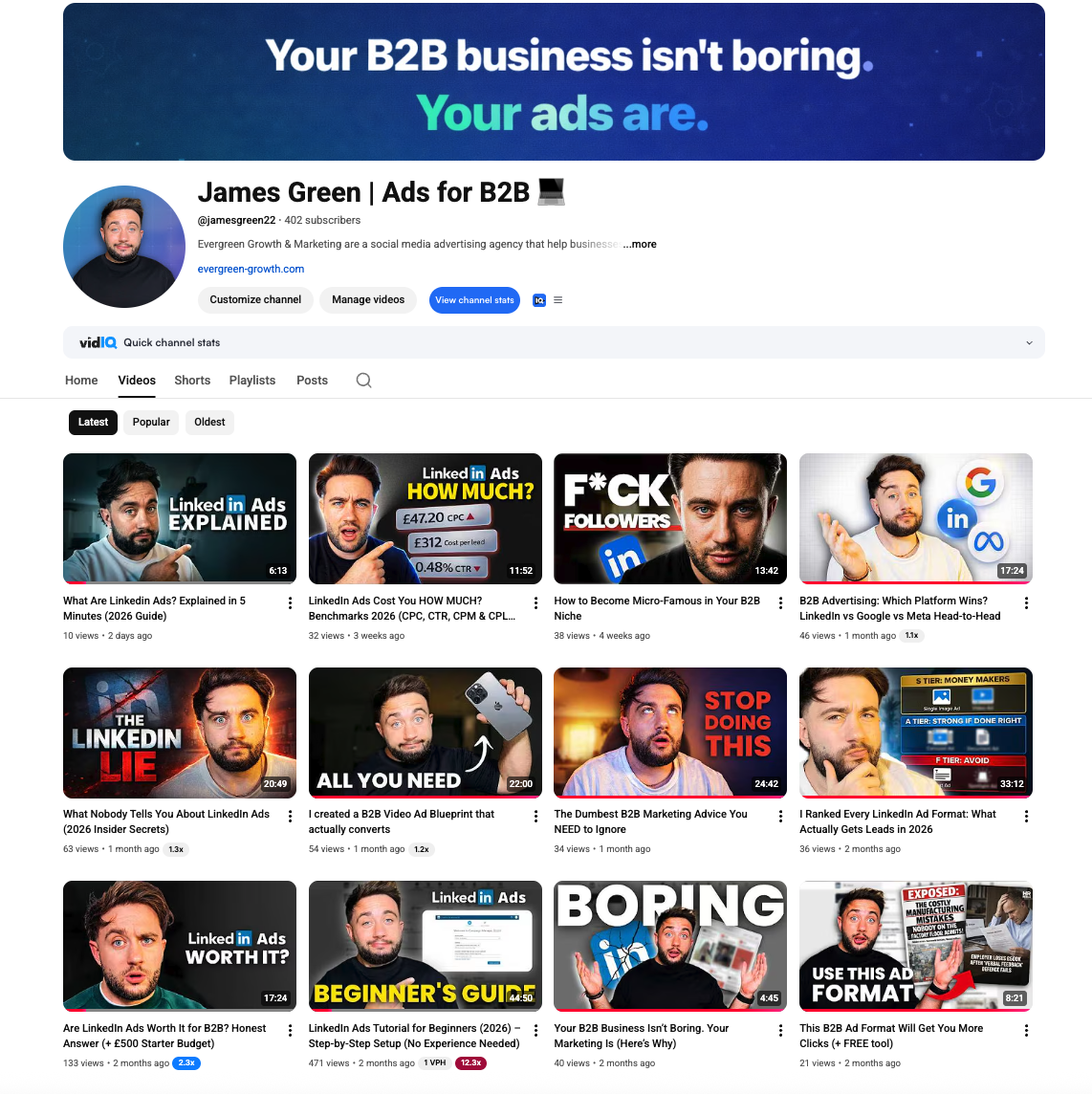
James Green | Ads for B2B
Free B2B advertising tutorials, LinkedIn Ads breakdowns, and creative strategy
Frequently Asked Questions
Related Tools & Resources
LinkedIn Ads Budget Calculator
Estimate your CPL, expected leads, and break-even deal size
LinkedIn Ads Benchmarks UK 2026
Complete CPC, CPM, CPL data by industry with expert commentary
Tracking Pixels Setup Guide [2026]
Complete guide to LinkedIn Insight Tag, Meta Pixel, and GTM setup
LinkedIn Insight Tag Setup
Step-by-step LinkedIn pixel installation for retargeting
Related Searches
People searching for this topic also search for: