

How to Add a User to Google Search Console (2026)
Your SEO agency or marketing team needs to see how your website performs in Google search. Which keywords you rank for. Which pages get clicked. Whether Google can even find your pages properly. That's all in Search Console.
Granting access takes about 60 seconds. Here's exactly how to do it, which permission to choose, and why you should never let someone else own this.
Written by James Green — I manage Search Console across dozens of B2B client properties. This is based on real setups, not Google's help articles.
🚩 You MUST Own Your Search Console
Search Console is your direct line to Google. It tells you exactly how Google sees your website. If someone else verified and owns your property, you're locked out of your own SEO data.
If Your Agency Is the Verified Owner
- ✗ They control who has access to your SEO data
- ✗ They can remove you from your own property
- ✗ Up to 16 months of search performance data is tied to their account
- ✗ Switching agency means losing access and starting over
- ✗ They could request URL removals from Google on your behalf
What You Should Insist On
- ✓ You verify ownership using DNS or HTML file on your domain
- ✓ You are the verified Owner
- ✓ Your agency gets Full User access
- ✓ You can monitor what they're doing and see the same data they see
- ✓ Switch agency and they still have zero historical data to take with them
The ownership verification stays with whoever added the DNS record or HTML file. If you control your domain, you control ownership. Get this right and nobody can lock you out of your own search data.
Why Grant Search Console Access?
If someone is doing your SEO, content marketing, or even just running your website, they need Search Console access. It's where you find out which pages Google is indexing, which keywords drive traffic, and where technical SEO issues are hiding.
Search Visibility
See exactly which keywords bring people to your site. The real data, not estimates.
Technical Health
Catch crawl errors, indexing issues, and Core Web Vitals problems before they tank your rankings.
Opportunities
Find keywords where you're close to page one. Easy wins your agency should be targeting.
Getting organic and paid working together? Our LinkedIn vs Google vs Meta comparison breaks down how each channel works for B2B and when to combine them.
Understanding GSC Permissions
Search Console keeps it simple. Three levels:
| Permission | Best For | What They Can Do |
|---|---|---|
| Owner | You (the site owner) | Everything: add/remove users, change settings, submit sitemaps, request removals |
| Full User | Agencies, SEO specialists | See all data, submit sitemaps, request URL inspections. Can't manage users. |
| Restricted User | Limited oversight | View limited search data only. Can't take any actions. |
For most setups: Give your agency Full User. Keep Owner for yourself. They get all the data they need without being able to manage access or remove you.
Step-by-Step: Add a User to Google Search Console
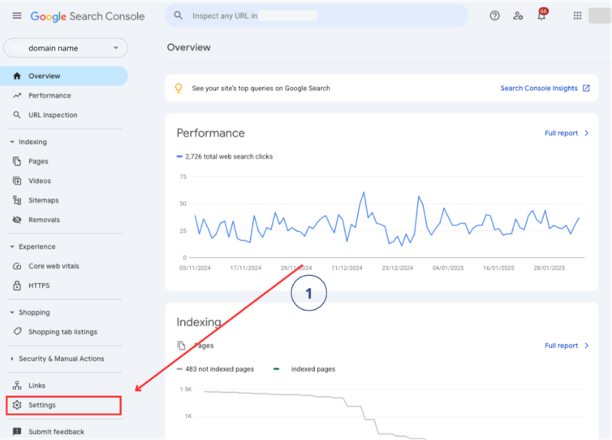
1Open Search Console Settings
Go to search.google.com/search-console and select your property. Click "Settings" in the bottom of the left sidebar.
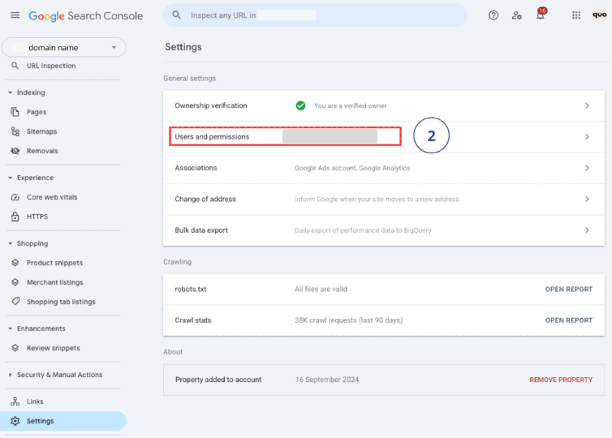
2Go to Users and Permissions
Click "Users and permissions". This shows everyone who currently has access and their permission level.
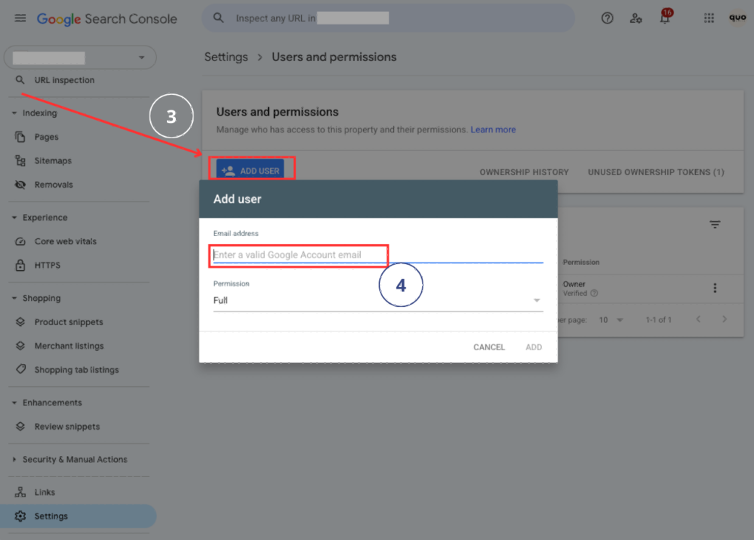
3Add User
Click "Add user". Enter their Google account email. Select "Full" permission for agencies or "Restricted" for limited view-only access.
Click Add. That's it. Access is instant. No invitation to accept.
What to Look at Once They're In
Search Console access without action is pointless. Here's what your agency (or you) should be checking first:
Performance Report
Which keywords drive traffic. Which pages get the most clicks. Where your click-through rate is low (meaning your title tags need work).
Coverage / Indexing Report
Are all your important pages indexed? If Google can't find a page, it doesn't exist in search. Fix errors here first.
Core Web Vitals
Page speed and user experience scores. Google uses these as ranking factors. If yours are poor, your rankings suffer.
Sitemaps
Make sure your sitemap is submitted and all pages are being picked up. If it's not submitted, do it now.
Links Report
Which sites link to yours (backlinks) and your internal link structure. Good agencies use this for SEO strategy.
B2B Content Marketing Guide
Search Console shows you what's working. This guide shows you how to create content that ranks and converts for B2B.
Read the full guideComplete B2B Advertising Guide
Organic and paid work best together. Use Search Console data to inform your ad targeting and landing page strategy.
Read the full guideNeed to grant access to GA4 and GTM too? Do all three: GA4 access guide | GTM access guide
Common Mistakes to Avoid
Letting your agency verify ownership instead of you
→ You verify ownership through DNS on your domain. They get Full User access. Ownership stays with whoever controls the domain.
Not having Search Console set up at all
→ GSC only stores 16 months of data. Every day without it is historical data you'll never get back. Set it up today.
Using URL prefix instead of Domain property
→ Domain property captures everything (www, non-www, http, https). URL prefix only tracks one exact format. Domain is better.
Not linking Search Console to GA4
→ Link them in GA4 under Admin → Product Links. This lets you see organic search data alongside your analytics. Hugely useful.
Giving Restricted access when Full is needed
→ If they're doing SEO work, they need Full access. Restricted is too limited for any meaningful SEO work.
Ignoring Search Console once it's set up
→ Check it monthly at minimum. Indexing issues, crawl errors, and ranking drops show up here before anywhere else.
AI Setup Assistant
Got a specific situation? Copy this prompt into ChatGPT or Claude for tailored help:
Google Search Console Access Setup Assistant
You are a Google Search Console expert. This prompt is based on the methodology from evergreen-growth.com/articles/add-user-google-search-console

I need help adding a user to my Google Search Console property.

Please ask me these questions one at a time, then provide customised guidance:

1. Have you already verified ownership of your site in Search Console?
2. Is your property set up as a Domain property or URL prefix?
3. Who are you adding? (agency, SEO specialist, team member, developer)
4. What do they need to do? (View search data, submit sitemaps, debug indexing)
5. Do they also need access to Google Analytics or Google Tag Manager?

After I answer, provide:
- Step-by-step instructions for my situation
- Which permission level to assign and why
- Whether they also need GA4 or GTM access
- Key reports they should check first
- Tips for getting the most from Search Console data
Search Console sorted. Here's the bigger picture.
Add a user to Google Analytics — GA4 shows what happens after someone clicks through from Google. You need both.
Add a user to Google Tag Manager — Where all your tracking tags live. Essential for conversion tracking.
Add a partner to Meta Business Manager — Running Facebook or Instagram ads alongside SEO? Here's the Meta setup.
Add a user to LinkedIn Campaign Manager — The LinkedIn ad account access guide. Same ownership principles apply.
B2B digital marketing strategy: where to spend your first £5k — Search Console data feeds directly into channel selection. Know where your organic traffic comes from before spending on ads.
LinkedIn vs Google vs Meta for B2B — Organic search (GSC data) combined with paid platforms. When to invest in each.
Want your whole Google stack set up properly?
We set up GA4, GTM, Search Console, conversion tracking, and all platform access as part of client onboarding. Clean data, properly connected, from day one. Takes about 15 minutes on your end.
Access is sorted. Now make sure your ads aren't boring.
Most B2B ads look like they were designed by a committee and approved by legal. If your campaigns are going to actually work, the creative needs to stop the scroll. These will help.
Scroll-Stopping Ads for "Boring" B2B
Your industry isn't boring. Your ads are. Here's how to fix that with proven creative frameworks.
Read the guideSteal These 4 B2B Ad Formats
The Elite Secret, Deal-Killer, Proof Ping, and Buyer POV. Real concepts you can take and run with.
Steal themFilm a B2B Video Ad on Your Phone
Your best sales pitch, filmed on your iPhone, running 24/7 to your dream customers. The exact blueprint.
Get the blueprintAnti-Ad Builder
Generate bold, pattern-interrupting ad copy that sounds nothing like your competitors. Built to stop the scroll.
Try it free6 ecom ad concepts stolen from B2C — DTC brands are years ahead on creative. These proven concepts, adapted for B2B, will make your ads look nothing like your competitors'.
B2B Facebook ad creative that actually works — Real examples with breakdowns. Formats for retargeting, cold prospecting, and lead generation.
CHAOS and SINK frameworks for B2B ads — Two frameworks and two creative drills to generate headlines that stop the scroll.
Watch Free B2B Ad Tutorials
Campaign breakdowns, creative strategy, and LinkedIn Ads walkthroughs — straight from a practitioner, not a guru.
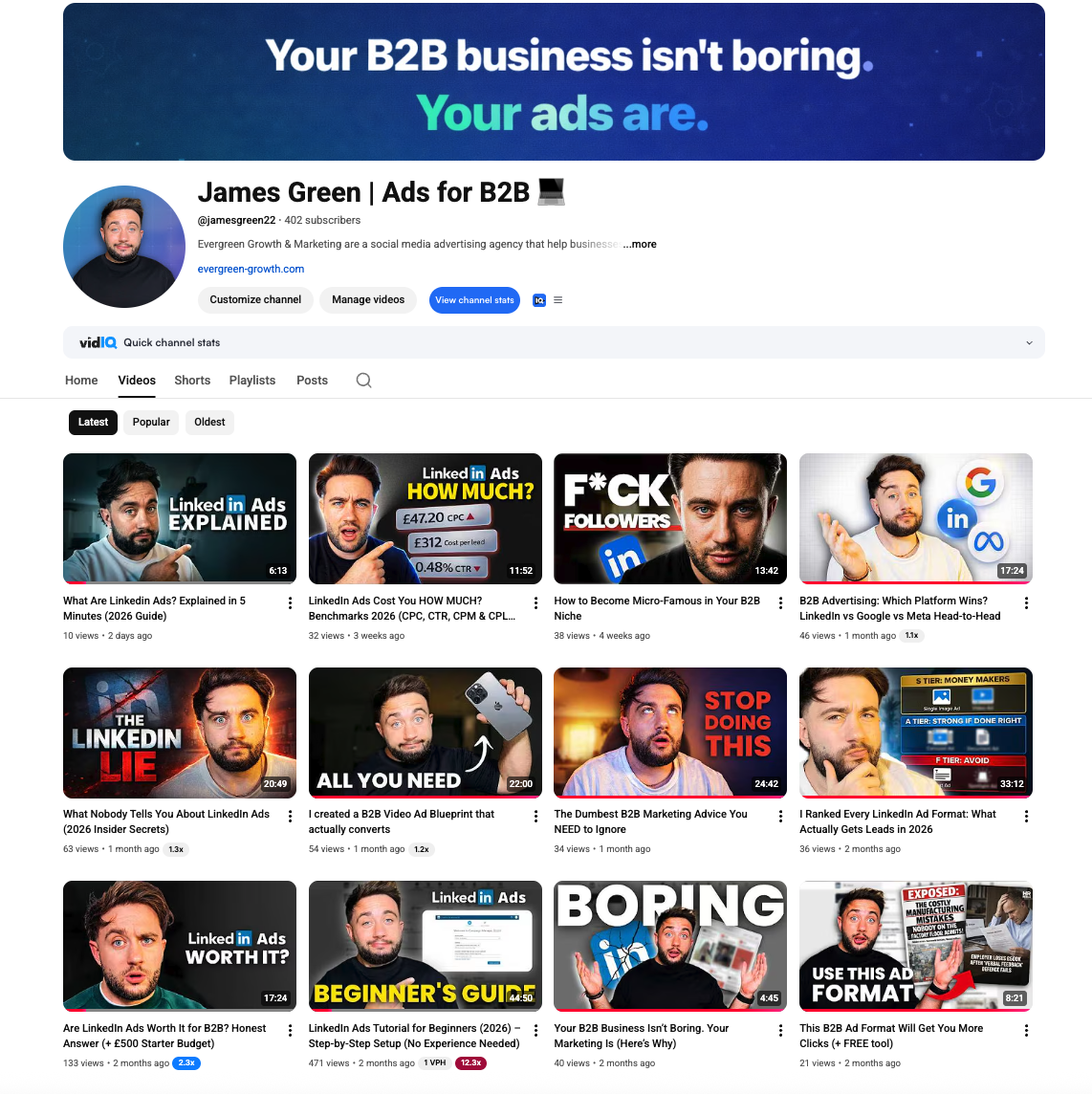
James Green | Ads for B2B
Free B2B advertising tutorials, LinkedIn Ads breakdowns, and creative strategy
Frequently Asked Questions
Related Tools & Resources
LinkedIn Ads Budget Calculator
Estimate your CPL, expected leads, and break-even deal size
LinkedIn Ads Benchmarks UK 2026
Complete CPC, CPM, CPL data by industry with expert commentary
Tracking Pixels Setup Guide [2026]
Complete guide to LinkedIn Insight Tag, Meta Pixel, and GTM setup
LinkedIn Insight Tag Setup
Step-by-step LinkedIn pixel installation for retargeting
Related Searches
People searching for this topic also search for: